A handbook for Advanced Clinical Practitioners
You already did the work.
The ePortfolio, backwards
Live the experiences forwards. File the ePortfolio backwards.
Introduction
A note from the author
I spent a year on my ePortfolio. Not because the work was hard; the work was the easy part. Nobody showed me the order.
I wrote my narrative twice, re-ticked my capabilities three times, and built my checklist in the final week with my heart in my mouth. Every one of those loops was avoidable, and every one had a name I only learned afterwards.
This book is the streamlined version: the order I wish I had been handed, the map I had to draw for myself, and my mistakes, labelled, so you do not need to make them.
You already did the work. Let us assemble it.
Start here
You already did the work.
The NHS ePortfolio (supported) route, backwards: assemble five years of practice into one submission, submit once, and get on with your job.
Cover · Introduction · Worksheets · Print edition · Back cover
You have made decisions at three in the morning that this portal now asks you to document in daylight. The clinical work never frightened you. The blank narrative box does. This book is the fix: it walks the submission backwards, so the first thing you write is the last thing you need, and nothing you do can be wasted.
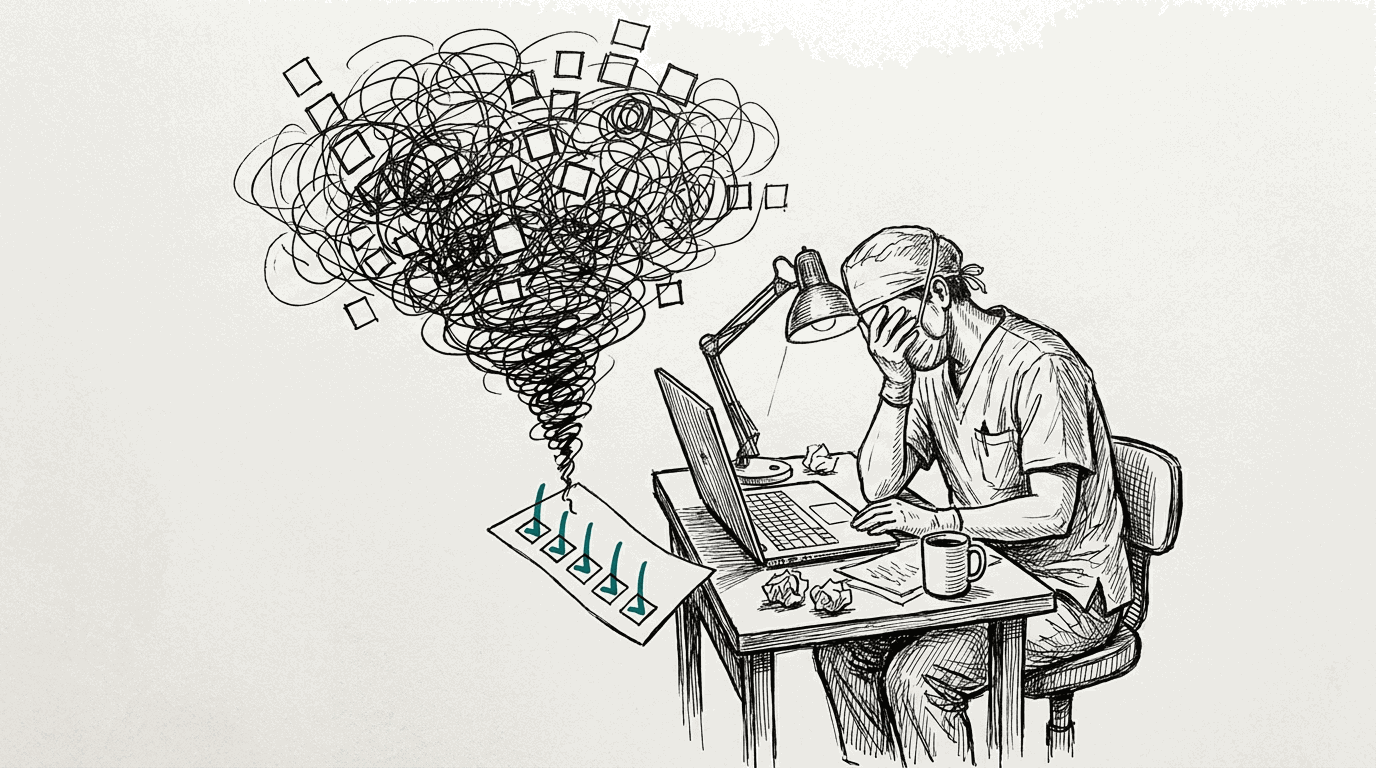
It is 9:40 on a Wednesday morning. Sam Archer has come off a shift in the emergency department, has eleven minutes before the next one, and opens the ePortfolio portal for the first time. The menu says Applications and Reports. Something called a Learning Needs Analysis wants attention.
There are four pillars, thirty-eight capabilities, and a critical narrative of up to five thousand words waiting somewhere in there. Sam closes the tab. That is the whole problem in one scene: not the work, but the fog around it.
This course clears the fog by walking backwards. We start at the frozen, submitted portfolio, the exact thing NHS England will read, and work back to what to write, what to upload, and what to gather. Every step removes a choice instead of adding one. By the end, nothing you write can be wasted, because nothing is written until the thing that uses it already exists.
This is a journey. Take your time. And if you are planning, here are numbers
This course is paced like a journey, and it is kinder to treat it as one. If you are on a deadline, or you simply want a plan, the honest estimate is between about 60 and 120 hours of real work, done in the gaps around a full-time job.
- Reading and sessions: 6 to 10 hours.
- Redacting, naming, uploading evidence: 10 to 20; slower than it sounds.
- Writing: 25 to 50; the narrative plus two case studies and two reflective accounts is 6,700 to 8,200 words of cited Master's-level prose, and redrafts take real evenings.
- Coordinating reviewers and your supervisor: 10 to 20, mostly chasing.
- Calendar: at three or four focused hours a week, roughly five to nine months, which is precisely why the route gives you twelve months from your final LNA meeting.
The window is not a deadline to fear; it is the route agreeing that this takes months alongside a job. The two longest waits are other people, so chapter 3 tells you to request feedback in week one.
After submission the official clocks start: provider verification within about four weeks, Centre quality and standardisation within about twelve, one resubmission opportunity if feedback comes back, and ten working days to appeal an outcome.
The chapters
-
1 The shape of the submission
overview
See the whole finite object at once, meet the four entities that compose it, and learn why working backwards never wastes a word.
-
3 One thread through the machine
map
Follow one piece of evidence through capabilities, pillars, narrative and checklist, and see where each portal screen fits. The scattered information, gathered back together.
-
5 Inventory: what you own
evidence inventory
Audit five years of practice against the required categories, choose your items, and name them so every later layer can reference them.
-
6 The capability grid
capability mapping, pillar planning
Tick the thirty-eight capabilities with confidence and build the pillar plan, four to six items per pillar, with honest reuse.
-
7 Skeleton before prose
outline, writing, linking
Place the word budgets and the evidence markers before any prose, then write section by section with links that cannot drift.
-
8 The final gate
checklist, submission
Submit in the right order: checklist, LNA gates, supervisor sign-off, declaration, the freeze, and what happens next, including the escape hatches.
-
Portal quick reference
map
Where every screen lives and what each button does, with the information each screen feeds into later steps.
Meet Sam
Sam Archer is an Advanced Clinical Practitioner working in emergency care, five years into the role, submitting a first portfolio. Sam has more material than he thinks, less time than he needs, and zero portal experience. He will walk every chapter with you. Each one begins with his current worry and ends with that worry resolved, so you can always see where you are in the arc from overwhelmed to submitted.
Two promises we make, and two rules we keep
This course is a planning companion. It helps you organise, structure and check your work. All writing for the portfolio stays yours.
NHS England permits generative AI for inspiration, information, planning and management, but it cannot write the applicant's critical narrative or evidence, and nothing here does. Examples in this book are structural: title formats, marker shapes, checklist allocations. They are synthetic and labelled as such.
The second rule is privacy. No applicant names, portal numbers or patient information appear anywhere in this book, and no example contains patient data. Do the same with your own material: redact before you upload, every time.
Where the facts come from
Every claim in this course traces to the official NHS England guidance or
to the Centre for Advancing Practice webinar transcripts captured in
docs-about/. The starting points are the
supported
route overview, the
evidence
guidance, the
critical
narrative guidance and the
submission
guidance. Where guidance changes, the chapters will say so rather than
guess.
Chapter 1
The shape of the submission
Sam Archer logs in on a Tuesday evening and counts the menus. Applications and Reports. A learning needs analysis with a status he does not understand. Somewhere behind it all, thirty-eight capabilities and four pillars and a blank narrative with his name on it.
He feels the familiar drop in his stomach, the sense of being handed a large object in the dark. This chapter turns the light on. The object is smaller than it feels.
- named the four objects that make up the whole submission, with their numbers;
- seen how the four objects join together, and which one drives;
- understood why working backwards means nothing you write gets thrown away;
- set up your progress map in the sidebar, saved in your browser.
The four objects
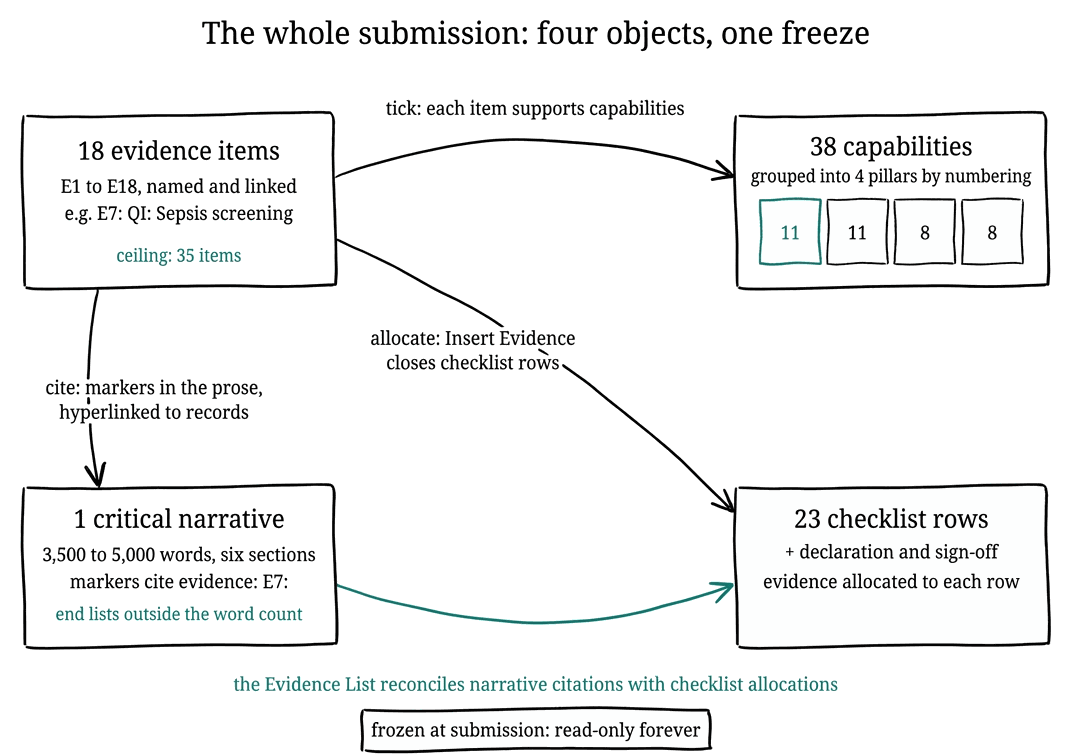
Strip the portal back to what the verifier actually reads and there are four objects. Nothing else is assessed.
- The evidence register. Up to thirty-five items, and in practice around eighteen, each one a record with a title, a code, a description, and one or more attachments. These are the exhibits; every other object points at them.
- The capability mapping. The 2025 framework has thirty-eight capabilities grouped into four pillars: Clinical Practice (11), Leadership and Management (11), Education (8), and Research (8). Each evidence item carries ticks against the capabilities it supports; the guidance suggests one or two high-quality items per capability, and four to six distinct items per pillar.
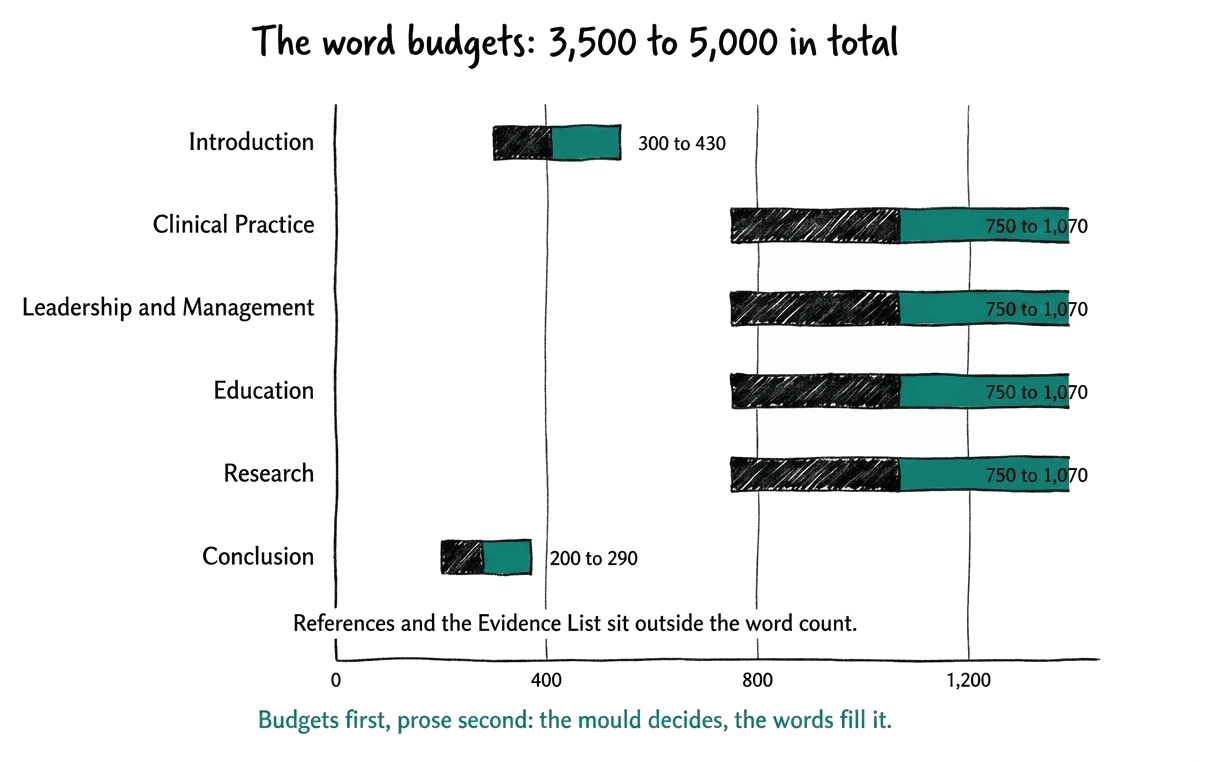
- The critical narrative. One essay of 3,500 to 5,000 words across six sections: an introduction, one section per pillar, a conclusion, plus references and an evidence list that sit outside the word count. Within the prose, your evidence appears as citations like [CS1] or E7:, each one a link to the matching record.
- The checklist and declaration. Twenty-three requirements, from the two reflective case studies to the GDPR statement, each satisfied by allocating evidence through the Insert Evidence button, finished with your educational supervisor's sign-off and your declaration.
The four joins
The objects are simple; the joins are the craft.
- Ticks. Evidence items tick capabilities, many to many.
- Belongs to. Capabilities belong to pillars, fixed by their numbering, so a tick on capability 1.6 is automatically a contribution to Clinical Practice.
- Cites. The narrative cites evidence items as linked citations, hyperlinked markers that point at their exhibit.
- Allocates. The checklist takes evidence items allocated to its rows, one Insert Evidence at a time.
One item can do several of these jobs at once, and the strongest portfolios are built from items that do.
Hear the rule that holds it all together: completion means the register, the capability ticks, the narrative markers, the hyperlinks and the checklist allocations all agree with each other. Every check in this course, and every finding this project's assurance report can produce, is a restatement of that one rule from a different angle.
Where this course starts in the route
For completeness, here is the road before this book.
- Check eligibility, gain your employer's endorsement, and submit an expression of interest.
- Join the waiting list; demand is high, and the wait is normal.
- Hold the Learning Needs Analysis, the gateway: your educational supervisor contacts you within a month of assignment, and you prepare your documents and confidence ratings at least five working days before the meeting.
- Begin at a recorded outcome of progress, with a twelve-month window in which you assemble everything in this chapter, and submit.
If your outcome involves further learning, the same map applies once that learning is done.
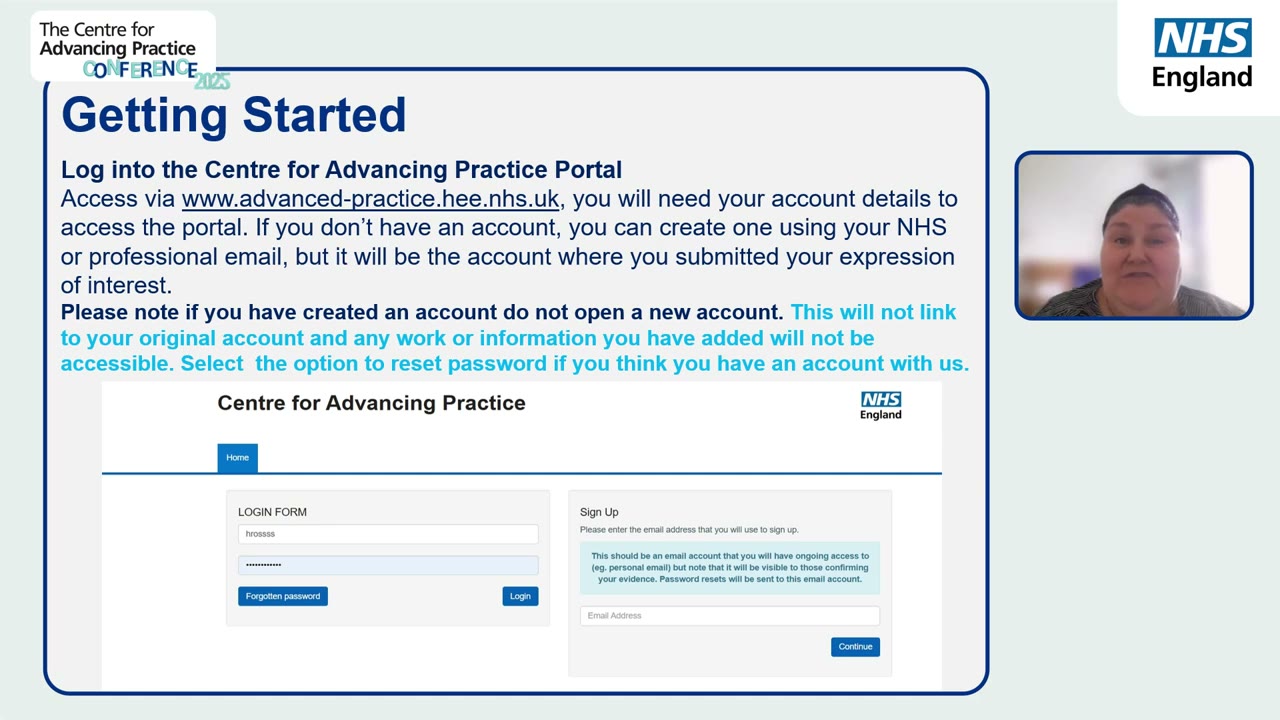
When you log in, use the account that submitted your expression of interest. The portal warns against opening a new one: a second account does not link to your original, and anything you added there will not be visible.
- The mistake. Reading the portal menu as the syllabus, and treating every screen as a thing to study.
- What goes wrong. The menu is organised around tasks, not around what gets read, so studying it never reveals the shape. Hours go in, and the object is still large and dark.
- Do this instead. Keep the four objects in view: the register, the ticks, the narrative, the checklist. If a screen does not feed one of those, it is machinery, and machinery can wait.
Make one folder called ePortfolio today, with three empty subfolders: evidence, narrative, and admin. Every file you gather from now on goes straight into one of the three. The single most common cause of lost weeks at submission time is hunting for documents across email, downloads and old USB sticks, and this one habit kills it before it starts.
Sam Archer opened this chapter feeling that the ePortfolio was a fog. He can now say it out loud: eighteen items, thirty-eight ticks, one essay of bounded length, a checklist of twenty-three rows. The fog has become a packing list, and a packing list can be worked. His worry for the next chapter is practical: fine, but where does any of this actually live in the portal?
- you can name the four objects and their numbers without looking;
- you can say why the narrative is written sixth, not first;
- your ePortfolio folder exists with its three subfolders;
- the sidebar progress list shows where you stand.
Chapter 2
Not an exam, and it is
Sam Archer hears the word portfolio and does what he did before exams at university: he opens the framework PDF after midnight and starts re-reading it, as if something will be tested. He highlights capabilities. He rereads the pillars. His tea goes cold beside the laptop.
Nobody is coming to test him. There is no exam hall, no invigilator, no grade for what he can recall on the day. This chapter is about putting the highlighter down.
- put down the highlighter: nothing here tests what you know;
- seen the backwards chain, nine steps from raw inventory to the frozen submission;
- seen what the order saves, and where the wasted four fifths goes;
- placed one real capability tick instead of an evening of studying.
Nobody is coming to test you
The ePortfolio route is not a knowledge test. There is no paper that grades what you know, no examiner probing your recall. It is an assembly job: five years of work you have already done, organised into one readable submission.
What shows in the portfolio is judgement, and your judgement is already in the material. It shows in selection and framing: which items you choose, how you name them, which capabilities you tick, how the narrative joins them up. You cannot revise for that the night before, and you do not need to. You have been building it your whole career.
The fog was the problem, not the work
The work itself was never the frightening part. Sam has five years of emergency care behind him and more material than he thinks. What scattered him was the fog around the work: menus that hide the object, guidance that arrives in the wrong order, and the suspicion that he should be studying. Clear the fog and the work is finite, and most of it is already done. So before anything else, give yourself permission to skip:
- Do not read all the official guidance before starting; the chapters tell you exactly which page matters and when.
- Do not write any narrative prose before your evidence is uploaded and named, because prose written first gets thrown away.
- Do not polish anything until the whole skeleton exists.
- Do not collect new evidence until chapter 5 shows you a real gap.
- And do not ask a chatbot to write your narrative: NHS England forbids it, and it flattens the one thing the assessors are reading for, your own judgement.
Why backwards
The submission freezes the portfolio. From the moment it is submitted the portfolio cannot be edited, so the end state is fixed and knowable. That is rare and precious: most large writing tasks have a moving target, and this one does not. So we start at the freeze and walk backwards, asking at each step what the next object up demands.
The checklist demands certain categories of evidence, so the inventory comes before any writing. Naming comes before citation, because a marker is a reference to a name. Capability ticks come before the pillar story, because the pillar columns are numbered. The outline comes before prose, because the word budgets and marker positions are the mould the prose is poured into. Nine steps, bottom to top, and each one removes a choice rather than adding one.
flowchart BT
  A["1 Raw inventory: what five years holds"] --> B["2 Name items: E n, CODE, title"]
  B --> C["3 Upload; tick capabilities on each item"]
  C --> D["4 Pillar plan: 4 to 6 items per pillar"]
  D --> E["5 Outline: budgets and marker placement"]
  E --> F["6 Write prose, section by section"]
  F --> G["7 Wire links; reconcile the Evidence List"]
  G --> H["8 Checklist: allocate evidence to 23 rows"]
  H --> I["9 Declaration and supervisor sign-off"]
  I --> J["The frozen submission: what they read"]
  style J stroke:#0d8377,stroke-width:2px
What this order saves
Applicants who work through the portal in menu order spend four to five times the effort this book asks for, and the extra four fifths is panic: prose rewritten, files renamed, capabilities re-ticked, lists reconciled that were never joined. Working backwards removes almost all of it:
- nothing is written twice, because nothing is written until the thing that cites it already exists;
- one join document replaces reconciliation panic at the end;
- feedback requests sent in week one turn the longest waits into background time.
The order is the method, and it is short enough to remember.
- The mistake. Starting by writing the narrative, because it is the biggest thing and it feels like the real work.
- What goes wrong. Prose written first cites evidence that does not exist yet, uses markers that do not match any record, and drifts away from the capability ticks when those are added later. Then it is rewritten. Often twice.
- Do this instead. Work in the order of the chain. The narrative is step 6 of 9. By the time you write a sentence, every fact it can cite already exists and has a stable name, so the prose can only fit the facts, never fight them.
If you feel the urge to study the framework, set a twenty minute timer and tick capabilities against one evidence item instead. Studying feels productive; placing one tick is productive, and it gives chapter 6 a first row to start from.
Sam Archer came to this chapter with a highlighter in his hand, half convinced something would be tested. He leaves it with the highlighter down: nobody is coming to test him, the portfolio is an assembly, and the assembly has a fixed order. His next worry is orientation: fine, but where does any of this actually live in the portal?
- you can say in one sentence why nobody is coming to test you;
- you can recite the nine steps of the backwards chain in order;
- you know which of the five permissions to skip tempts you most, and why taking it is the expensive choice;
- one evidence item carries at least one real capability tick.
Chapter 3
One thread through the machine
Sam clicks through the portal on his lunch break. The LNA lives in one place. The evidence lives in another. The narrative in a third, the checklist in a fourth.
Each screen looks complete on its own and says nothing about the others, and that is exactly what applicants tell us: the information is scattered, and nowhere shows how it connects. This chapter is the fix. We will follow one piece of evidence through every screen it touches, and then lay the whole flow out in one table you can keep.
- a one-glance map of every portal screen and the information flowing between them;
- followed one evidence item end to end, from upload to checklist;
- a crosswalk table showing what each screen collects and where that information reappears;
- started your own join document, the one thing the portal does not keep for you.
Why the portal feels scattered
Every portal screen is built around one task: the LNA screens run the learning needs analysis, the evidence screens hold your records, the application screens hold the narrative, the checklist screens run the final checks. That is sensible engineering and terrible orientation, because your information does not live in one task. One evidence record is created on the evidence form, read by the capability grid, cited in the narrative, listed in the evidence list, allocated to the checklist, and possibly sent for peer review. Six screens, one record, and no screen shows the other five.
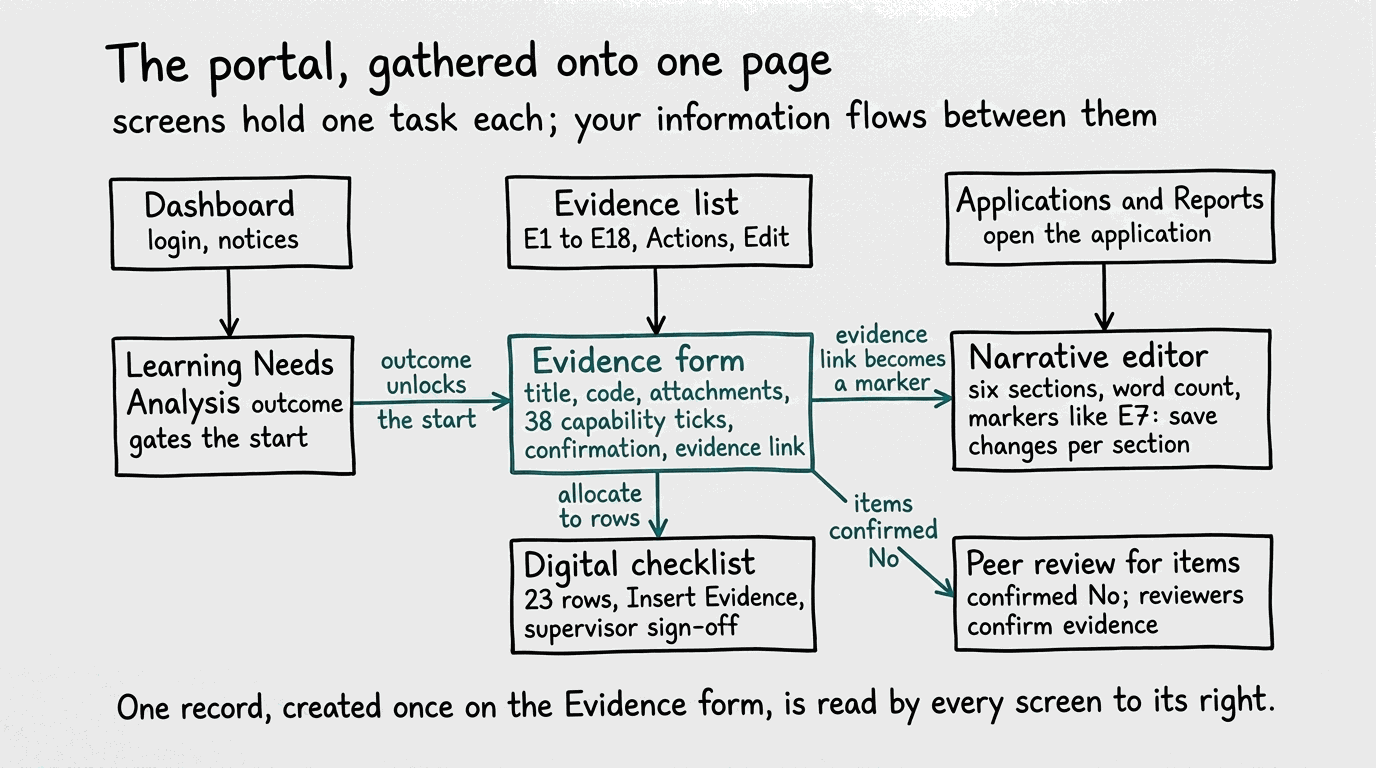
The four entities, joined
Chapter 1 named the four objects. Here is how they join. Evidence ticks capabilities, many to many. Capabilities belong to pillars, fixed by their numbering, so a tick on 1.6 is automatically a contribution to Clinical Practice and a tick on 4.2 to Research.
Evidence also appears in the narrative as hyperlinked markers, and it is allocated to checklist rows. The arrows all point outward from the evidence items, which is why the inventory comes first in everything that follows.
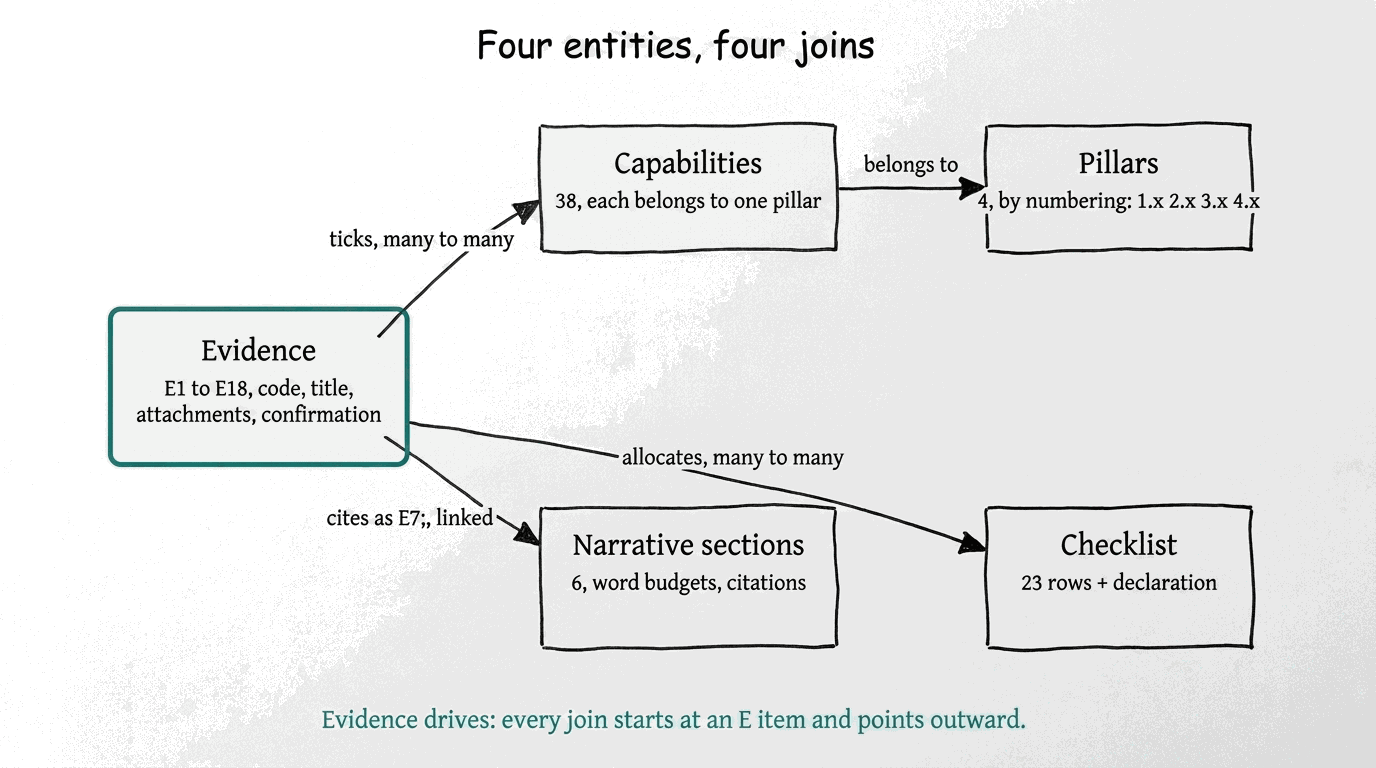
One thread: the journey of E7
Follow one synthetic item, a quality improvement project, through the whole machine. Nothing about it is special; that is the point. Every item you own will make the same journey.
- Born on the evidence form. Sam creates the record and gives it its permanent name: E7: QI: Sepsis screening improvement project. He uploads one redacted PDF, writes a short description, and saves. The portal gives the record a link. That link is about to matter everywhere.
- Ticked against capabilities. On the same form, Sam ticks capability 1.6 (synthesising sources for clinical reasoning) and 1.7 (initiating and modifying interventions), both Clinical Practice, and capability 4.2 (evaluating practice and acting on findings) in Research. Selection is a claim, not a verdict; the supervisor conversation comes later.
- Placed in the pillar plan. Because of those ticks, E7 counts toward Clinical Practice as a Core item and toward Research as a Supporting item. Sam's plan does not use it for Leadership and Management or for Education, and that is fine; not every item serves every pillar.
- Cited in the narrative. In the Clinical Practice section, Sam writes about the screening change and ends the paragraph with the marker E7:, hyperlinked to the record's portal URL. The marker number and code must match the record exactly.
- Listed once. The Evidence List at the end of the narrative gets exactly one entry for E7, with the same link. One record, one list entry, however often the prose cites it.
- Allocated to the checklist. On the checklist screen, Sam uses Insert Evidence to allocate E7 to the row Audit, service improvement, practice development or quality improvement evidence. The same document now satisfies a submission requirement.
- Confirmed. The record's confirmation radio says Yes: the QI report was externally verified, so no peer review is needed. Had it said No, E7 would have gone to peer reviewers, which is a normal route, not a failure.
One document, three jobs at least: it carries capabilities into two pillars, it anchors a paragraph of prose, and it closes a checklist row. Most of portfolio strategy is choosing items that travel well, and this journey is the test.
The crosswalk: what each screen collects, and where it reappears
| Portal screen | What it collects | Where that information reappears |
|---|---|---|
| LNA pages | Your learning needs analysis, supervisor review, recorded outcome, your acknowledgement | It gates the start: the application opens properly once the outcome is acknowledged, and the development plan shapes what evidence you will gather |
| Evidence list | The register of your records, E1 upward, with Actions and Edit | The source of every citation and allocation; its titles are the names the whole portfolio references |
| Evidence form | Title, code, description, attachments, the 38 capability ticks, the confirmation choice, and the record's link | Everywhere: the ticks feed the pillar story, the link becomes the narrative marker's target, the record feeds checklist rows and peer review |
| Applications and Reports | The entry point to your ePortfolio supported route application | Opens the narrative editor and the sections the verifier reads |
| Narrative editor | Six sections of prose with a live word count; markers such as E7: with hyperlinks; saved per section | The thing being verified; its markers must resolve to evidence records and its Evidence List must reconcile with them |
| Digital checklist | Twenty-three requirements with evidence allocated via Insert Evidence, plus supervisor sign-off | The final gate before declaration; its allocations point straight back at evidence records |
| Peer review | Reviewers' confirmation for records whose confirmation choice was No | Feeds back into the evidence record's status; completion is checked separately from the No choice itself |
- The mistake. Working through the portal in menu order, top to bottom, treating each screen as its own job.
- What goes wrong. You complete screens that later screens silently disagree with. Titles get set before you know what the narrative needs to cite. Capability ticks get added after prose was drafted around a different story. Then the reconciliation work begins, and it is always bigger than the original work.
- Do this instead. Work in information order, the backwards chain from chapter 1. The evidence record is finished, named and linked before anything references it, so every later screen agrees with it by construction.
Start a join document today: one simple table, paper or spreadsheet, with a row per evidence item and columns for its name, its portal link, the capabilities you plan to tick, the pillar or pillars it serves, and where in the narrative you expect to cite it. Ten minutes per item. This document is the map the portal never gives you, and it makes every later chapter a fill-in exercise instead of an act of memory.
Sam Archer came into this chapter asking where anything lives. He now has a map of the screens, one worked journey he can copy eighteen times, and the start of his join document. His next worry is the obvious one: all right, but which of my own documents actually count?
- you can say, for any portal screen, what it collects and which later screen reads it;
- you can recite the journey of E7 without looking;
- your join document exists with its first row filled in, even if the item is a placeholder.
Chapter 4
The first sixty minutes
Sam sits at the kitchen table with a diary, a pen, and a twenty-minute timer on his phone. Five years of emergency care are in that diary, in fragments, and he has never once tried to write them all down in one sitting.
This chapter is that sitting. One hour, four moves, and the inventory has started before a single page of guidance has been read.
- one folder called ePortfolio, ready to receive everything;
- a brain-dump page covering the last five years, written in one sitting;
- that page held against the categories in chapter 5, with the filled boxes marked;
- the first three rows of your join document, each with a working title and a source.
The ritual
Do not read the guidance yet. Your first hour looks like this:
- Make one folder called ePortfolio. It becomes the single home for everything that follows.
- Set a twenty-minute timer and brain-dump the last five years. Roles, projects, audits, teaching, feedback, committees: write everything you can recall, without judging any of it.
- Hold the page against the categories in chapter 5. Mark the boxes your five years already fill.
- Pick your first three items. Give each a working title and put it on the join document.
You have started, and it cost one hour.
Where the memories live
- Diaries and calendars. Five years of entries are a factual skeleton of your working life. Read them through once and let each entry wake the memory that sits beside it.
- Prompted memory. Walk your own timeline ward by ward and post by post. At each stop, ask what you changed, taught, fixed or led.
- Colleagues. Ask them what they remember you doing. Other people hold half your evidence, and they will name things you have forgotten.
- Inboxes and shared drives. Search your name and your project names. The dated replies you find are evidence that you were there and did it.
Write everything down. Memory alone is not an inventory.
One home for everything
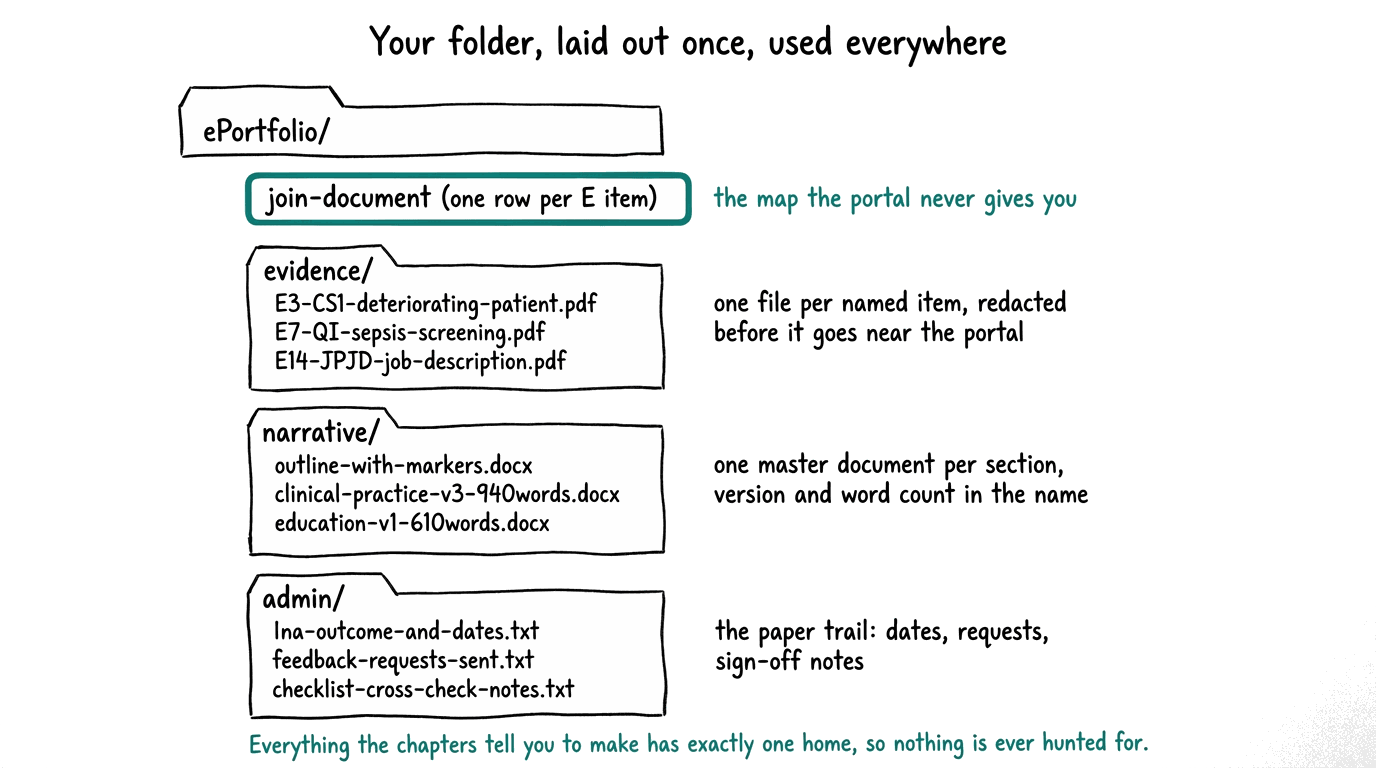
Give every file one home as it arrives, using the layout above. The join document sits at the top because it is the map. Named, redacted documents go straight into evidence. Your per-section master documents, named with version and word count, live in narrative.
Dates, requests and sign-off notes go into admin. Five seconds of filing per document now buys you back whole evenings of hunting later.
The join document begins
The join document is one table, one row per item, and it grows a column at every later stage. Chapter 3 opened it; the first sixty minutes put its first real rows in. Working title, category, and where the item came back from are enough for now.
| Row | Working title | Category | Where it came back from |
|---|---|---|---|
| E3 | CS1: Managing an undifferentiated deteriorating patient | Reflective case study | Own memory, confirmed by a debrief email |
| E7 | QI: Sepsis screening improvement project | Audit and quality improvement | The QI lead's shared drive and a colleague's memory |
| E11 | FB: Multidisciplinary colleague feedback | Colleague feedback | A 2024 diary entry naming the feedback round |
| E14 | JP/JD: Advanced practitioner job description | Job description | The HR file for the current post |
The rows are synthetic, like all the examples in this book; copy the shape, not the content.
- The mistake. Trusting your memory to hold the inventory, or leaving the hunt for files until the end.
- What goes wrong. What you did not write down in the hour is quietly gone, and the brain-dump thins with every week. The deferred file hunt then lands at the worst possible moment, late in the process, when drives have been archived and old colleagues have moved on.
- Do this instead. Write every item down during the gathering hour, however small, and pull each file into your ePortfolio folder while you are finding it. If a file will not turn up, put it on the gathering list with a date instead of trusting yourself to remember.
Put a date on your gathering list the day you write it. A list with a closing date is a task you can finish; a list without one becomes a background worry that runs for months. When the date arrives, stop on purpose and look at what is still empty.
Sam Archer set the timer at six in the evening and wrote until it rang. The page came back fuller than he expected: roles he had half forgotten, a sepsis audit, two teaching sessions, a feedback round he organised, a guideline rewrite. Held against the categories, more boxes took a mark than he had dared to hope, and the folder on his desktop is now called ePortfolio, with his first three rows already in the join document. His next question is the naming one: what does each of these items count as?
- one folder called ePortfolio exists on your machine, with the join document at its top;
- the brain-dump page covers five years, written in one sitting;
- every line on the page is marked against a category from chapter 5, or set aside as unclear;
- the join document has its first three rows, each with a working title and a source.
Chapter 5
Inventory: what you own
Sam stares at his brain-dump page. Five years of emergency care in messy handwriting: locum shifts, a sepsis audit, two teaching sessions, a departmental feedback round he organised, a guideline rewrite, a complaint turned into a service change. It looks like a career's scrap heap. It is actually most of a portfolio. This chapter turns the scrap heap into a register, one row at a time, and gives every row a name the rest of the submission can point at.
- matched your brain-dump against the published evidence categories and seen which boxes are already filled;
- a shortlist of candidate items, well inside the thirty-five ceiling;
- a permanent name for each shortlisted item in the E[n]: CODE: title shape;
- a gathering list for the few categories still empty.
The categories are fixed; that is the good news
The submission checklist names the kinds of evidence required. They do not change from applicant to applicant, which means you can hold your five years against them right now and see the shape of what remains. The published set: two reflective case studies of at least 800 words each, two reflective accounts of at least 800 words each, an assessment of competence or clinical capability, your current job description, your current CV, two colleague feedback items, two patient, service-user or carer feedback items, leadership skills evidence, a team leadership episode, education or training delivery, applying research in practice, audit, service improvement, practice development or quality improvement evidence, and a confidentiality and GDPR statement. On top sit the process gates: the LNA and development evidence, the completed narrative, checklist sign-off, and the declaration.
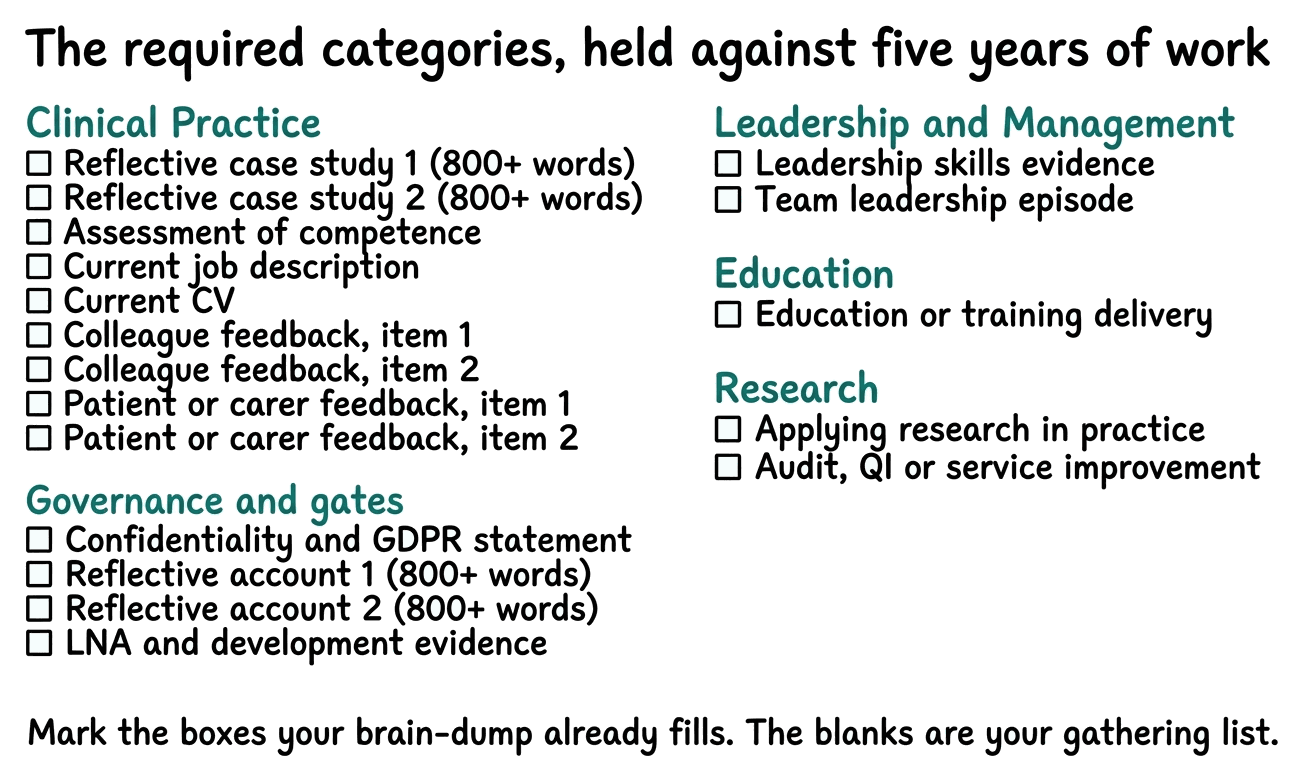
Work down the list with your brain-dump page beside it. For each category, ask one question: is there something in the last five years, already written or already done, that could serve here? If yes, drop the document into your evidence folder and add a row to your join document. If no, add the category to your gathering list. Most applicants find they can mark more than half the boxes in this first pass.
The two feedback categories are the slow ones, because they depend on other people. Ask for colleague feedback and patient or carer feedback in the first week, before you need them. Everything else in the inventory is under your control; feedback is not, so start it earliest.
Choose fewer than you think
The ceiling is thirty-five items, and the guidance is clear that quality beats quantity: one or two high-quality items per capability, and four to six distinct items per pillar as advisory balance. In practice a portfolio of around eighteen well-chosen items covers all thirty-eight capabilities comfortably. Every extra item is another title to keep consistent, another set of ticks to reconcile, another citation to link, and another row for your supervisor to review. A smaller register with stronger items is less work and reads better.
Two filters decide what stays. Recency: normally the past five years, and if something older still applies to your current practice, you will need to say how you have used, kept up and built on that learning, so prefer recent material. Privacy: nothing containing patient information enters the portal, and portfolios containing it are not accepted, so redact before you shortlist, not after you upload.
Three more habits belong in the selection pass.
- Answer the summary box early. Every record carries a summary box in the portal, and it asks for three things: why you included the item, what it shows, and whether you were leading, contributing, or watching. Answer those at shortlist time while the memory is fresh.
- Keep attachments lean. Five per item is the ceiling, and each one must earn its place.
- Know the certificate rule. Certificates of attendance alone never count. What counts is your reflection on impact: what you learned, how you applied it, and what difference it made.
- The mistake. Waiting for perfect evidence, or starting to collect new material before checking what the inventory already covers.
- What goes wrong. Months pass gathering impressive new documents while perfectly good existing material sits unused, and the gathering never converges because there is no list it is closing. Or the reverse: a weak item is force-fitted into a category late, when a swap would have cost nothing early.
- Do this instead. Finish the category pass first. Gather only for the boxes still empty, and date your gathering, so a month from now you can stop on purpose rather than drift.
Name them once, correctly
Every item gets a permanent name in the published shape: E[number]: CODE: descriptive title. The number is its place in your register. The code says what kind of evidence it is; the published codes include CS, REFL, CR, JP/JD, FB, Leader, LPEP, EDU, TRAIN, RE, CA, AU, SI, PD, QI, and OTH, with numbered case studies like CS1 and CS2 where you have more than one. Use JP/JD for a job plan or job description; JR is not a published code. The title carries the claim: write what the item shows, not what the file was called.
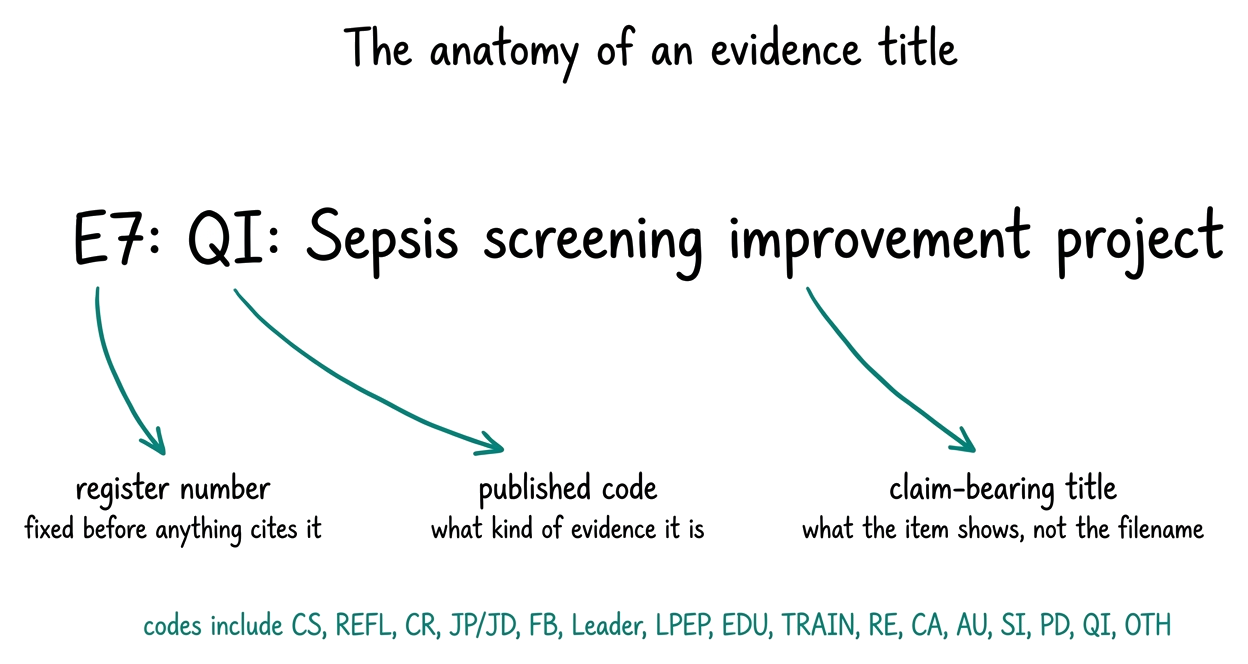
- E3: CS1: Managing an undifferentiated deteriorating patient (a reflective case study, the first of two, hence CS1)
- E7: QI: Sepsis screening improvement project (a quality improvement item; the title says what it demonstrates)
- E11: FB: Multidisciplinary colleague feedback, spring cohort (feedback evidence, grouped as one record with two attachments if both items arrived together)
- E14: JP/JD: Advanced practitioner job description, current post (the required current job description)
The pattern to copy: number, then code, then a title a stranger could match against the document without opening it.
Why the naming comes before anything cites these items: the narrative will quote them as markers, the Evidence List will repeat them, and the checklist will allocate them. If a title changes after those layers exist, four places must be reconciled instead of one. Folder labels first, contents after.
Sam Archer marked eleven of the category boxes on his first pass, which surprised him. His gathering list has four items on it, and two of those are feedback requests he sent this afternoon. His shortlist sits at sixteen items. For the first time, his worry has a size, and the size is manageable. His next question is the grid one: how do sixteen items cover thirty-eight capabilities without gaps?
- every published category is marked filled or on the gathering list;
- your shortlist is at most about twenty items, each with a permanent name in the E[n]: CODE: title shape;
- every shortlisted document sits in your evidence folder, redacted;
- your join document has one row per shortlisted item.
Chapter 6
The capability grid
Sam opens his first evidence form in the portal and finds thirty-eight checkboxes staring back. His first instinct is the common one: tick most of them, because the sepsis project was genuinely good, and surely a strong item shows most of what an advanced practitioner does. He stops himself, because he has read this chapter first. The grid is not a form to maximise. It is a set of claims to place, one or two quality items at a time.
- a paper pass of all thirty-eight capabilities against your shortlist, recorded in your join document;
- a tick plan where every capability has one or two items and every item has at least one;
- a pillar plan with four to six distinct items per pillar, each marked Core or Supporting;
- the two questions to ask your educational supervisor about the plan.
The shape of the grid
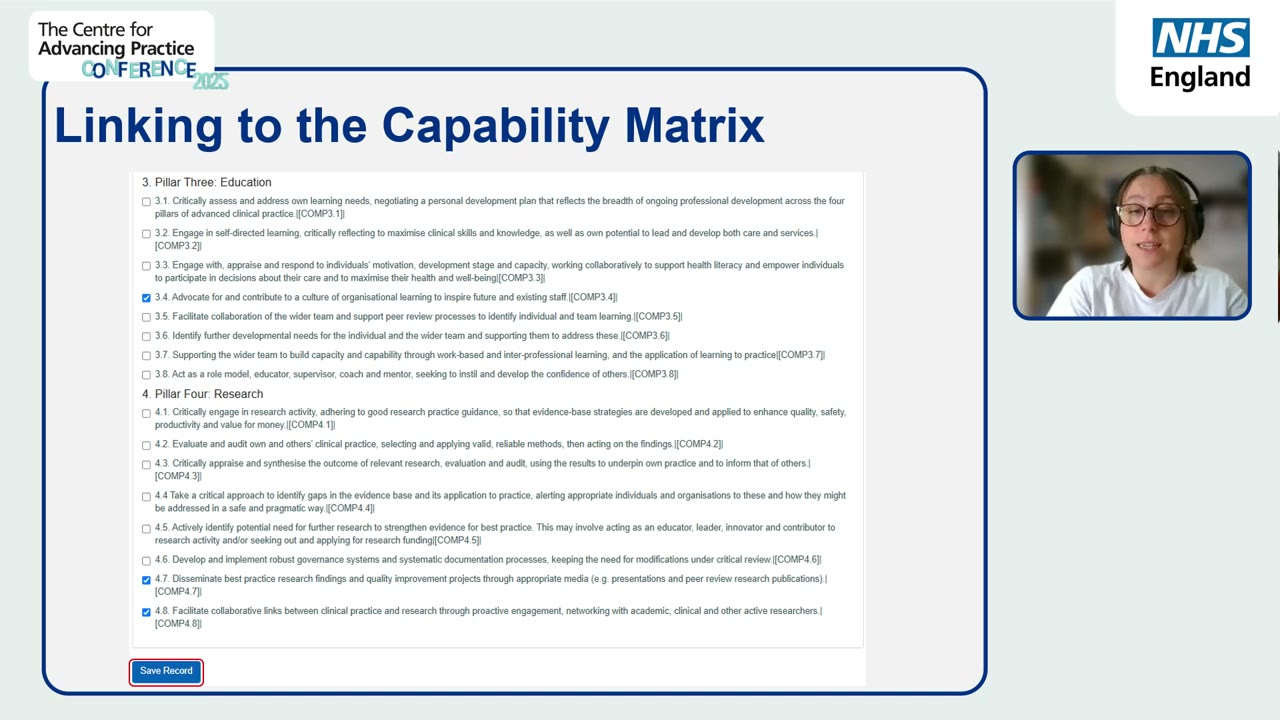
The 2025 Multi-professional Framework for Advanced Practice has thirty-eight capabilities in four pillars, and the pillar of a capability is fixed by its number: 1.1 to 1.11 are Clinical Practice, 2.1 to 2.11 are Leadership and Management, 3.1 to 3.8 are Education, and 4.1 to 4.8 are Research. You never choose a capability's pillar. You choose which of your evidence supports which capabilities, and the pillars follow. If you have seen the older framework, be reassured: the 2025 edition is a refresh, not an overhaul. The pillar names did not move, and of the thirty-eight capabilities only two changed wording, 1.5 and 2.1.
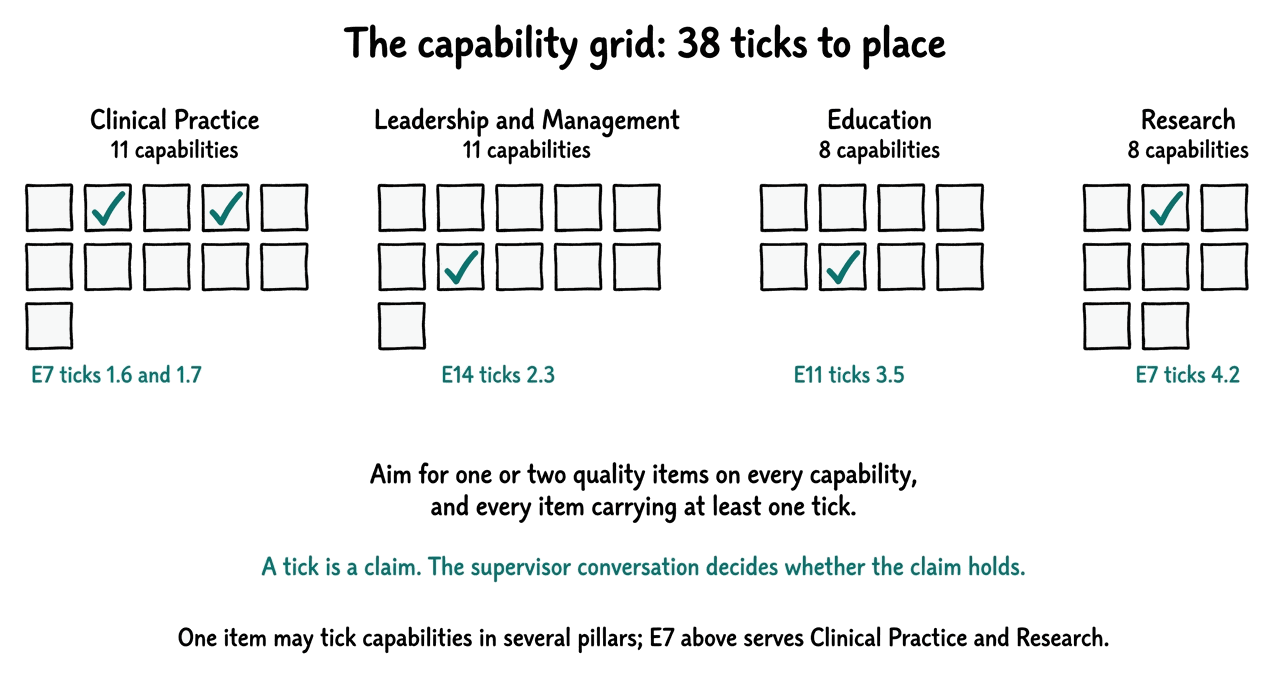
That is the actual form: every capability in the framework listed with a checkbox, grouped by pillar, with a Save Record button at the bottom. Your paper pass becomes these ticks, one screen at a time.
Do the paper pass before the portal pass
Work one pillar at a time, on paper or in your join document, before you touch the checkboxes. Read each capability's wording, then ask which of your shortlisted items demonstrates it. Record the plausible ticks per item. The paper pass is faster, calmer, and easier to revise with your supervisor than clicking around a live form, and it produces the plan you will simply type in afterwards.
The target shape has two properties. Every capability ends up with one or two quality items behind it; the guidance suggests that balance, and it is what a verifier expects to see. And every evidence item carries at least one tick, because an item that supports no capability has no job in the portfolio. If an item finds no capability after an honest pass, that is information: it may belong on the gathering list's spare bench rather than in the register.
- The mistake. Ticking every capability a strong item could plausibly touch, so the grid fills quickly.
- What goes wrong. The grid stops reading as claims and starts reading as enthusiasm. Your supervisor cannot tell which capabilities you genuinely rest on the item for, verifiers see the same inflation pattern often, and when one item carries half the framework, the narrative that cites it becomes overloaded and thin. Deflating a grid later is also more work than placing ticks carefully once.
- Do this instead. For each capability, pick the one or two items that show it best, and leave the rest unticked even when they could stretch to it. Precision is the claim. If a capability stays empty after the pass, that is a genuine gap: gather for it, or discuss it, rather than papering it with a stretch tick.
A tick is a claim, not a verdict
Selection and proof are different things, and the portal treats them that way. Ticking 1.7 against the sepsis project says: this item is offered as evidence for this capability. Whether the claim holds is the conversation you have with your educational supervisor, and for items confirmed No it is the peer reviewers' work. That separation is a comfort, not a threat: you are not self-certifying mastery, you are organising material for people whose job is to review it with you.
The pillar plan
Once the ticks are placed, the pillar plan falls out of them almost for free: for each pillar, list the distinct items that tick into it. The advisory balance is four to six distinct items per pillar. One item may appear under several pillars where it genuinely supports them; that is expected and fine.
What matters is honesty about the role. Mark each item Core, meaning it anchors that pillar's story, or Supporting, meaning it reinforces a story another item anchors. Reuse stated plainly reads as strength; reuse hidden reads as padding.
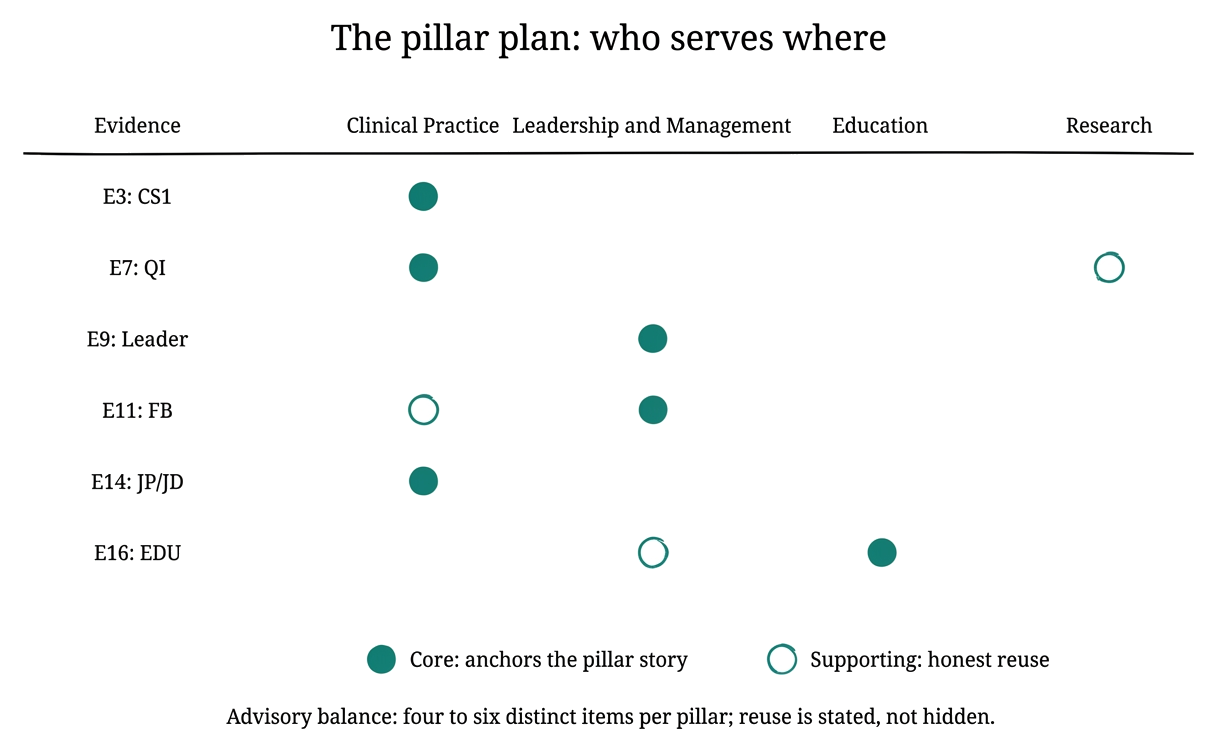
A balanced plan at this point looks like Sam's: roughly six items serving Clinical Practice, six for Leadership and Management, six for Education, five for Research, with a few items counted twice. Eighteen items, all thirty-eight capabilities touched, and every pillar inside the advisory band.
Do the capability pass pillar by pillar, not item by item. Reading the eleven clinical capabilities in order with your shortlist beside them takes one sitting and produces consistent ticks; bouncing between items produces drift, where the same capability gets three items early in the afternoon and none by evening.
Sam Archer finished his paper pass in two evenings. Two capabilities in Education came up empty, and instead of stretch-ticking them he wrote gather on the plan, because he teaches a monthly session that has never been written up. His pillar plan balances at six, six, six and five. He has drafted the two supervisor questions below and sent them with the plan. His remaining worry is the big blank one: the narrative itself.
- Here is my pillar plan with Core and Supporting roles. Which item would you most want me to swap, and why?
- Which two capabilities do you think my evidence supports least convincingly, so I can strengthen them before drafting?
- your join document shows a tick plan: one or two items per capability, at least one capability per item;
- your pillar plan lists four to six distinct items per pillar with Core and Supporting roles;
- empty capabilities are marked gather or discuss, never silently stretch-ticked;
- the plan has gone to your educational supervisor with the two questions above.
Chapter 7
Skeleton before prose
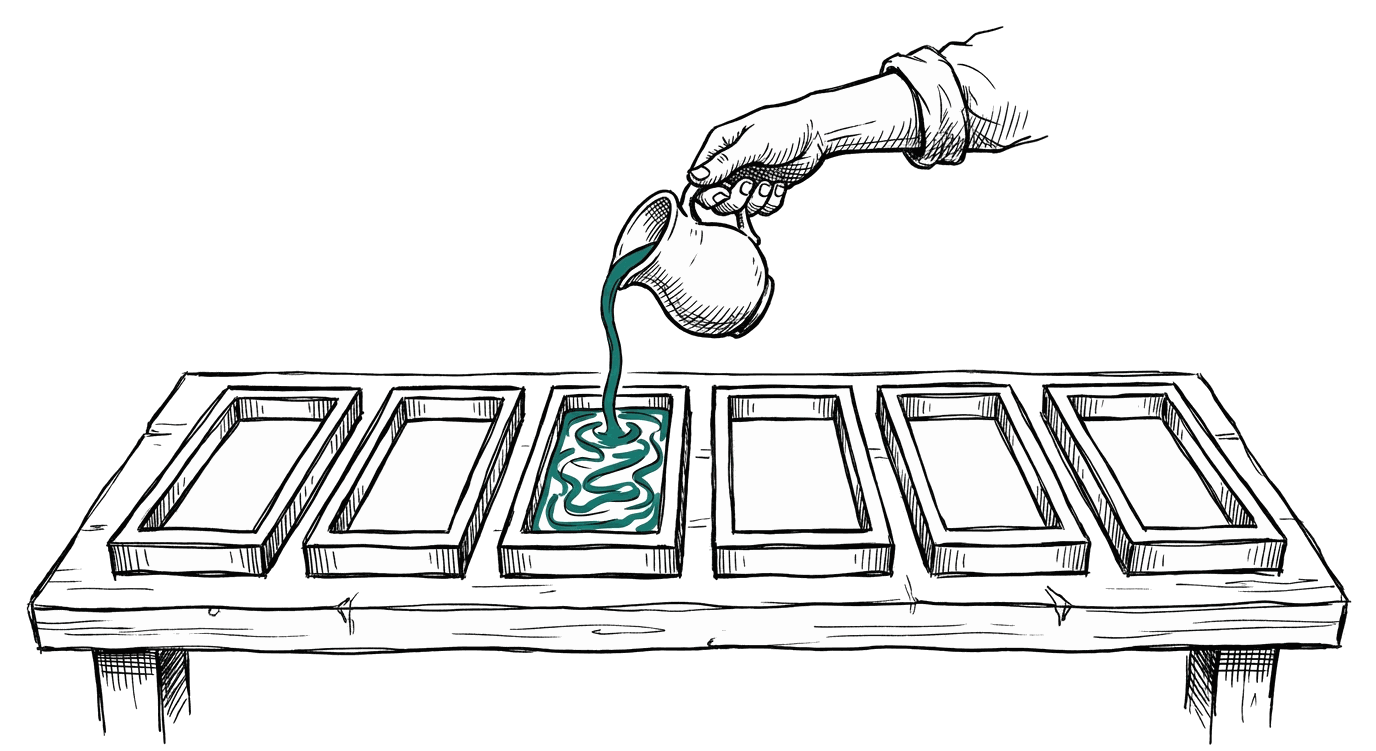
Sam opens the narrative editor for the first time and does the one thing this chapter exists to prevent: he puts his fingers on the keyboard to see what comes out. What comes out is a pleasant, meandering paragraph about becoming an advanced practitioner, with no evidence in it and no pillar behind it. He deletes it, and this time he starts with the skeleton: six headings, a word range under each, and the E numbers that will appear in each. Only then does he write a sentence.
- the word budgets for all six sections, and the total they add up to;
- an outline that places every evidence marker before any prose exists;
- a paragraph pattern (claim, evidence, reflection) you can repeat until the section is done;
- the linking rules that keep markers, records and the Evidence List from drifting apart;
- the practical save routine for the portal editor.
The budgets
The critical narrative runs 3,500 to 5,000 words across the six sections below, and the published planning ranges tell you exactly how to divide them. The References and Evidence List sit outside the word count.
| Section | Planning range | Job of the section |
|---|---|---|
| Introduction | 300 to 430 | Who you are, your scope of practice, and the shape of what follows |
| Clinical Practice | 750 to 1,070 | The argument for the Clinical pillar, anchored on its Core items |
| Leadership and Management | 750 to 1,070 | The argument for the Leadership pillar |
| Education | 750 to 1,070 | The argument for the Education pillar |
| Research | 750 to 1,070 | The argument for the Research pillar |
| Conclusion | 200 to 290 | What the four pillars make together, and where your practice goes next |
The outline: markers before words
For each section, write one line per intended paragraph: the point of the paragraph in plain words, and the E number it will cite. That line is a contract with yourself. When you draft the prose, each paragraph already knows its claim and its evidence, so the writing is filling a mould rather than inventing a building. This is also the moment drift dies: every marker placed in the outline matches a record that already exists, because chapter 5 named them and chapter 6 seated them.
Clinical Practice (target 900 words)
- Para 1: scope and clinical context; no citation needed
- Para 2: recognising deterioration earlier; cites E7:
- Para 3: a complex case worked through uncertainty; cites E3: (CS1)
- Para 4: shared decisions with patients and families; cites E5:
- Para 5: what these three show together; no new citation
Five lines. An evening's outline. A week of prose made safe.
The paragraph pattern
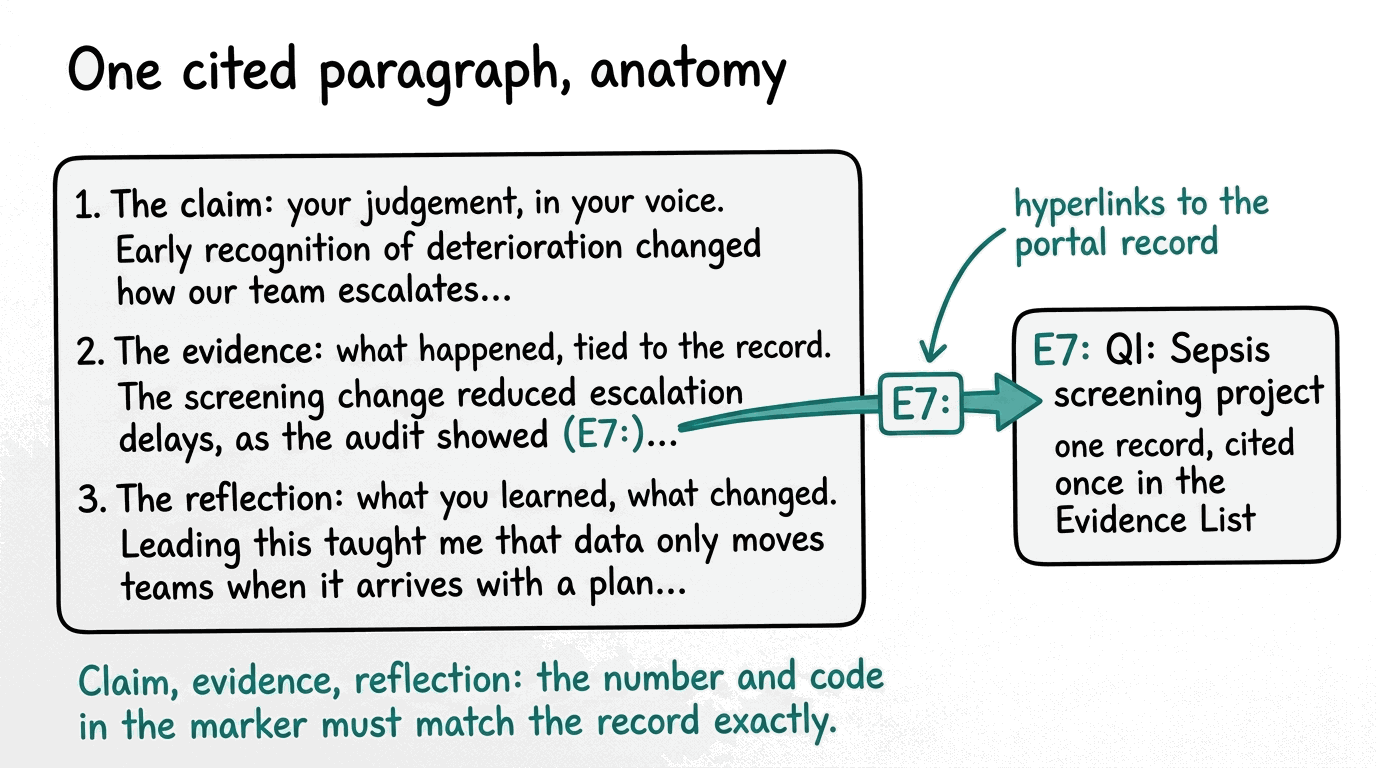
Almost every body paragraph in an advanced practice narrative has the same three bones. The claim: your judgement, in your own voice. The evidence: what actually happened, tied to the record with its marker. The reflection: what you learned and what changed in your practice because of it. The marker is the hinge; it is what lets a verifier walk from your sentence to your document in one click.
The linking rules
Three rules keep the machine honest.
- Cite every record you rely on, in the published style: a square-bracket reference to the evidence's code, such as [CS1], [REFL2] or [QI7]. The link itself is made with the portal's insert evidence reference function, which joins each citation to the record's portal URL at the end of the narrative. In portal text these citations can also appear as E-number markers like E7:; the form varies, the rule does not.
- Match every citation to its record exactly: the code, and where numbered, the number, so [CS1] resolves to your first case study and nothing else.
- Carry exactly one entry per cited record in the Evidence List at the end, with the same link, and keep the academic References list as a separate index for published sources. Two indexes, never merged.
If you keep these three rules as you write, the reconciliation pass at the end becomes a confirmation instead of a rescue. Every claim then leads to its record, and every record appears once.
- The mistake. Citing vaguely, writing things like "as my audit showed" with no marker and no link, because it reads more smoothly.
- What goes wrong. The markers and their links are precisely what a verifier follows from your claim to your proof. A smooth uncited sentence is an unsupported claim, and at review time it either fails or forces a panicked wiring pass through finished prose, which always damages the prose.
- Do this instead. Any sentence that rests on a record carries that record's citation, placed as you write, not after. Smoothness survives a two-character marker; it does not survive a retrofit.
The practical save routine
You can write directly in the portal or draft offline and paste in; both are officially fine, and the reliable routine is the same either way.
- Draft the section offline in your own document, then open the section in the editor with the Edit icon.
- Select all and paste (Ctrl V, or Cmd V on a Mac).
- Check the live word count against your budget.
- Press Save Changes.
- Confirm the saved notification before you leave the screen; if the unsaved changes notice is showing at the bottom of the text box, the section is not saved, whatever else you believe.
One section per sitting keeps the word count honest and the sessions short.
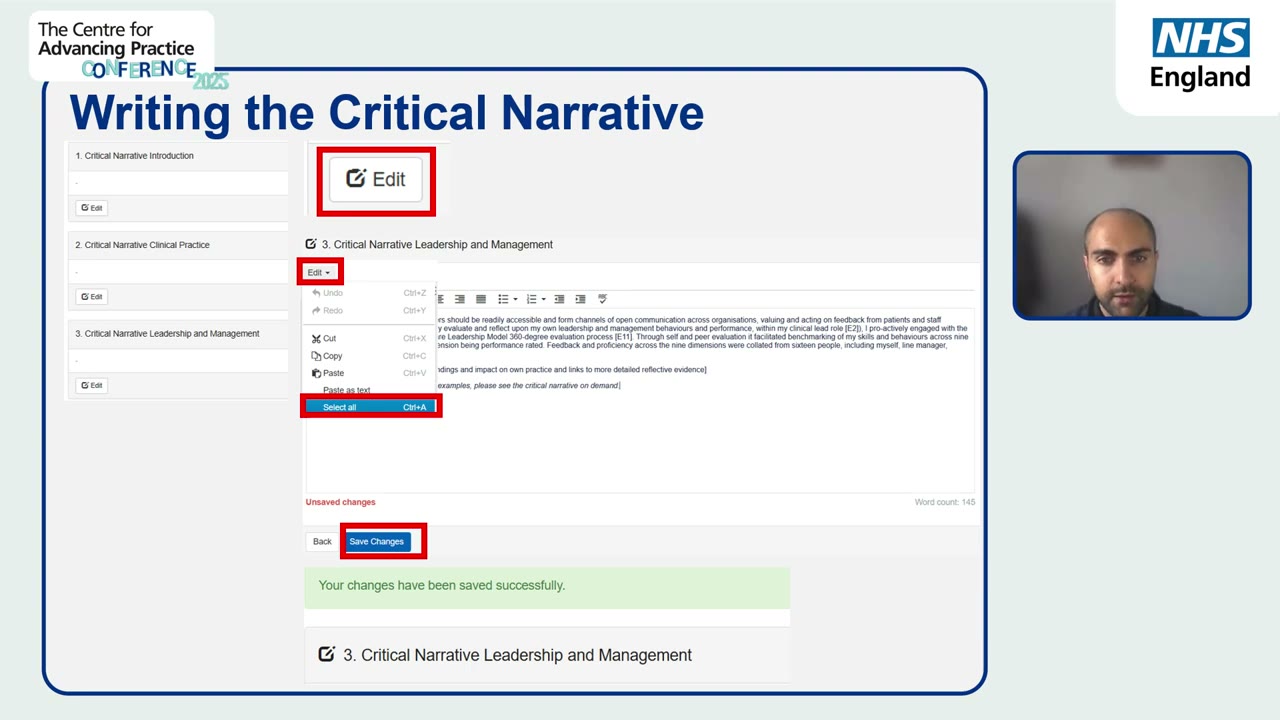
The walkthrough shows the whole routine in one screen: open the section with Edit, select all and paste your offline draft, watch the word count at the bottom right, and press Save Changes. The red Unsaved changes notice is the trap; the green saved confirmation is the receipt. Do not leave the screen until you see the green one.
Keep one offline master document per section, named with the section and its budget, like clinical-practice-v3-940words. Versions plus word counts in the filename mean you always know which draft is current and how far you are from the range, without opening the portal.
The guidance publishes its own writing tips, and they are worth keeping beside the keyboard. Do: keep a logical order; be precise and concise; signpost; put your important points in prime position; summarise then analyse; link knowledge areas together; give specific examples; pass judgement with reasoned opinion; anticipate weaknesses and account for them; conclude on whether the capability or pillar is met. Do not: muddle everything together; repeat or over-explain; be vague or waffle; use loaded or deliberately emotive language; assume the reader knows your role, when you should tell them explicitly why it is relevant and what it shows.
What the writing stays
One rule of this route is absolute, and it is worth stating in full. NHS England permits generative AI for inspiration, information, planning and management, but it cannot write the applicant's critical narrative or evidence, and the ePortfolio must be the applicant's own work. Unattributed AI use is treated like plagiarism: the portfolio will not be progressed, and the consequences can include informing your statutory regulator or your employer.
So this course gives you structures, budgets, patterns and review questions, and never drafted prose. The voice in those sections must be yours, because the judgement in it is what is being assessed. Your rough, specific, first-person account of real clinical work is exactly right; a polished synthetic voice is exactly wrong.
Sam Archer outlined all six sections in one evening and wrote Clinical Practice across two lunchtimes: 940 words, five paragraphs, three markers, all linked as he went. The strangest part, he says, is that it did not feel like writing at all. It felt like filling in a shape he had already built. His remaining worry is procedural: what happens when it is all written, and how does it actually go in?
- all six sections outlined with budgets and marker placements;
- the prose drafted section by section, each paragraph carrying its hyperlinked marker where it cites;
- word counts inside the planning ranges, checked against the live counter;
- the Evidence List and References drafted as two separate indexes.
Chapter 8
The final gate
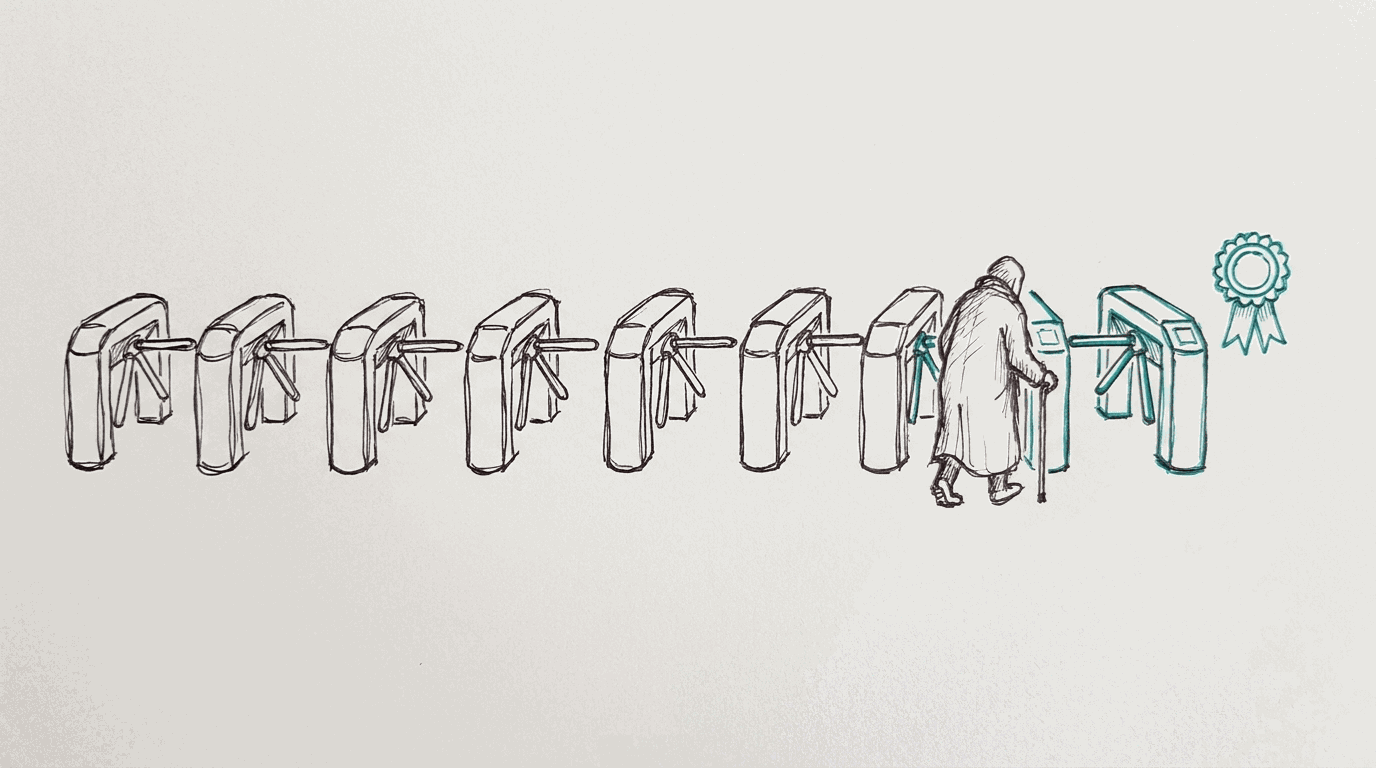
Sam is further than he has ever been: sixteen records named and ticked, a narrative inside its budgets, markers linked as he wrote them. What remains is procedural, and procedural is exactly what he used to fear, because nobody had ever shown him the order. So here is the order, gate by gate, in the sequence that makes each gate cheap.
- the submission order, gate by gate, and the reason for that order;
- the checklist routine, row by row, with the allocation method;
- the supervisor steps named precisely, including sign-off and submitting for verification;
- the freeze understood, and the escape hatches mapped, so the end of the process is not a cliff.
The order
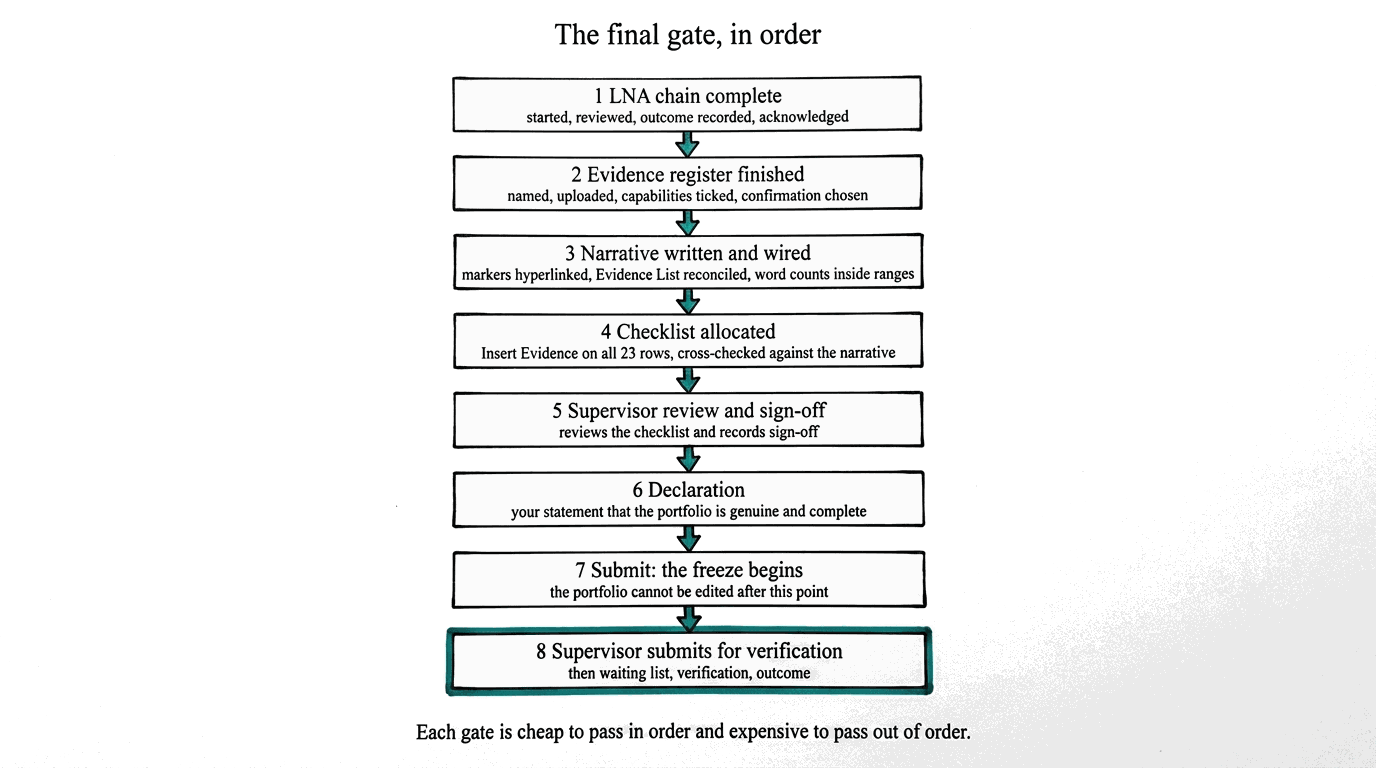
Three notes on the order.
- The LNA chain runs first in the portal's own chronology: you start the Learning Needs Analysis, your educational supervisor reviews it and records an outcome, and you acknowledge that outcome. An outcome of one means no additional learning is required and you can begin the ePortfolio and submit within twelve months of the final LNA meeting; other outcomes shape your development first. If any of this is uncertain in your case, talk to your supervisor before acknowledging, because the acknowledgement is the starting gun for everything here.
- The digital checklist is worth starting early, not last. It can be opened and populated as your evidence lands, so the allocation work is spread across weeks instead of landing in one dreadful evening. Each row is satisfied with Insert Evidence, choosing the record or records that meet it, and then cross-checked against the narrative so the two layers agree.
- The declaration comes after sign-off, not before. Your educational supervisor reviews the checklist and records sign-off; only then do you complete the declaration and submit. Once submitted, the portfolio cannot be edited. The freeze is why this course is so obsessive about order: every check before the freeze is cheap, and every check after it is a formal process.
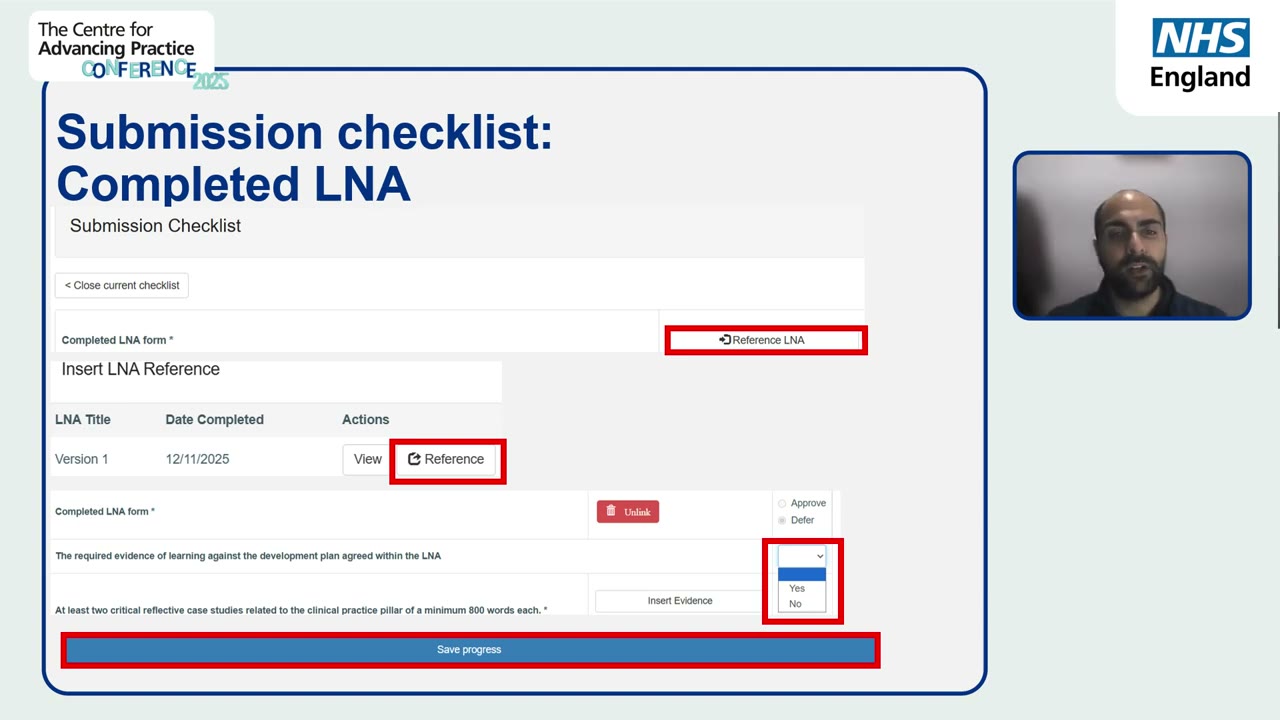
That is the real checklist screen: each requirement as a row, an Insert Evidence button beside it, a Yes or No choice, and a Save progress bar. The rows are the published categories you met in chapter 5, wearing their portal clothes.
Row: Audit, service improvement, practice development or quality improvement evidence.
Allocation: Insert Evidence, choose E7: QI: Sepsis screening improvement project.
Cross-check: E7 is cited in the Clinical Practice section, its marker is hyperlinked, and its Evidence List entry carries the same link. Three places, one record, no disagreement.
- The mistake. Leaving the checklist to the final week and allocating rows from memory.
- What goes wrong. Rows get allocated to items that do not really meet them, or to items that were never cited, and the cross-checks surface the disagreements all at once, days before the deadline, when fixes cost the most calm you do not have.
- Do this instead. Allocate each row the day the evidence behind it is finished, and cross-check it against the narrative then. The checklist becomes a running log instead of a final exam.
After the freeze
Submitting is not the end of attention, but it changes who is acting. Your educational supervisor submits the ePortfolio for verification; from there the process runs through verification, and there is guidance for while you are on the waiting list. And the route has real escape hatches, which is worth knowing in advance, because corridors feel different when you can see the doors.
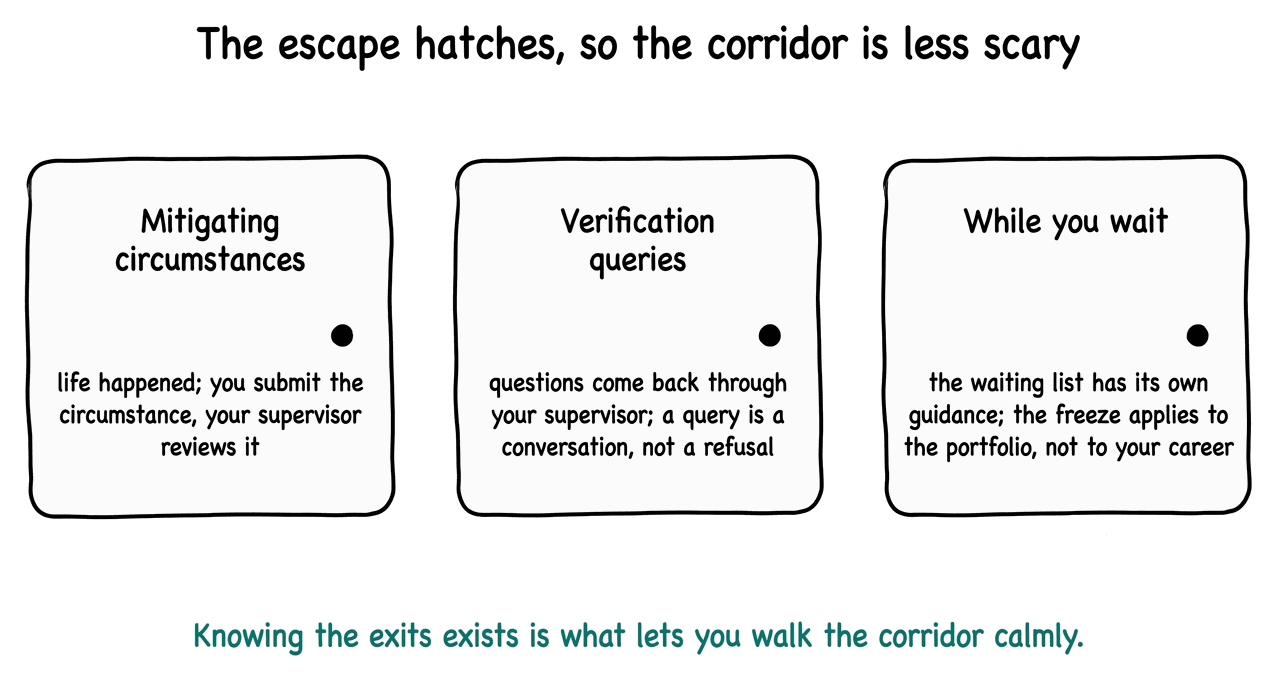
If life happens mid-process, you submit a mitigating circumstance and your supervisor reviews it; that mechanism exists precisely because the route assumes real people with real lives. If verification raises questions, they arrive as things to answer, not as verdicts. And if you are waiting, there is published guidance on what to do with the interval. None of these doors are failures. They are the route, working as designed.
The official timings, for planners
- The working window: submit within twelve months of the final LNA meeting. Missing it without agreed mitigating circumstances means the application times out on the portal, marked incomplete, and can no longer be submitted or edited. The absolute maximum on the route is twenty-four months, only with agreed mitigating circumstances.
- Verification: the education provider is expected to complete review and verification within about four weeks of submission.
- Centre quality and standardisation: the target is within about twelve weeks, and panels usually sit monthly.
- Resubmission: there is one opportunity to amend and resubmit against feedback, and it reopens the portfolio with a reset deadline. Mark new or changed evidence with new or revised in the filename, archive the old item, create a fresh checklist with the new links, and update the evidence list in the narrative.
- Appeals: an appeal must be made within ten working days of receiving the outcome.
Before you submit, run one freeze rehearsal: read the narrative aloud once, click every marker to confirm it resolves to the right record, and read the checklist top to bottom confirming each row's allocation. Two hours, once. It is the cheapest insurance in the entire process, because after the freeze the same checks would cost a formal process.
Sam Archer submitted on a Thursday afternoon, after the freeze rehearsal found one marker pointing at the wrong record and he fixed it in two minutes. His supervisor submitted the portfolio for verification the following week. The thing he tells people afterwards is short: it was never a writing project. It was a filing project with a story in the middle, and the order was the whole trick.
- the LNA chain is complete and acknowledged;
- all checklist rows allocated and cross-checked against the narrative;
- supervisor sign-off recorded, declaration completed;
- submitted, frozen, and handed to verification with the supervisor's submission.
Reference
Portal quick reference
The screens in the order you will actually meet them. Every row says what
the screen collects and what later step reads it, because that is the part
the portal never shows you. The watch links are the official NHS England
walkthrough videos; transcripts of all of them sit in this repository under
docs-about/.
| Screen | What you do there | Feeds into | Watch |
|---|---|---|---|
| Login | Enter your username and password, click the login icon | Everything | critical narrative video, opening |
| Learning Needs Analysis | Start your LNA; your supervisor reviews it and records an outcome; you acknowledge the outcome (outcome one: begin the ePortfolio and submit within twelve months of the final LNA meeting) | The starting gun for the whole application | start an LNA, submit an LNA, acknowledge the outcome |
| Evidence list | Your register of records; open any with Actions then Edit | Every citation and allocation references these records | archive evidence |
| Evidence form | Title, code, description, the summary box (why included, what it shows, leading or contributing or watching), attachments (five per item at most), the confirmation choice, and the 38 capability ticks. Copy the record's evidence link. Confirmation happens one of three ways: portal peer review, another organisation such as a university or professional body, or an editorial process such as a published paper. Note the lock: inviting a peer reviewer freezes the item, and only its number and title stay editable | The narrative citations point at these links; ticks feed the pillar story; records feed checklist rows | upload attachments |
| Peer review | Invite peer reviewers for records confirmed No; reviewers confirm the evidence; supervisors can access evidence for review | The record's confirmation journey | invite peer reviewers, how reviewers confirm evidence |
| Applications and Reports | Open the view icon under your ePortfolio supported route application, then the application section, then Start application process | The narrative editor | complete the critical narrative |
| Narrative editor | Six sections, each opened with the edit icon; write directly or paste from offline (select all, then Ctrl V, or Cmd V on a Mac); watch the word count; press Save changes and check the unsaved changes notice is gone | The thing the verifier reads; its markers must resolve to evidence records | critical narrative webinar, linking evidence to the matrix |
| Digital checklist | Start it early; satisfy each of the twenty-three rows with Insert Evidence; your supervisor submits the checklist with sign-off | The final gate before declaration | start a checklist, supervisors submit a checklist |
| Mitigating circumstances | If life happens, submit the circumstance; your supervisor reviews it | Your timeline, protected | submit a mitigating circumstance, supervisors review one |
| After submission | Your supervisor submits the ePortfolio for verification; there is guidance for while you are on the waiting list | Verification and outcome | what happens after submission, while you're on the waiting list |
Longer orientations, when you want the full picture
- Your Route to Recognition: understanding the ePortfolio route (the full overview webinar)
- Introduction to the route and portal and introduction to the portal (the two portal walkthroughs)
- Evidence webinar (choosing and preparing evidence in depth)
- Employer confirmation process and introduction for employers
- Identifying your advanced practice or training hub lead
Appendix
Worksheets
Print these or copy them into your own document. Every template appears in its chapter as a worked example; here they are blank and ready.
The join document
One row per evidence item; it grows a column at every later stage. This is the map the portal never gives you.
| E# | CODE: title | Category | Ticks | Pillars | Cite in | Checklist row | Link | Confirmed |
|---|---|---|---|---|---|---|---|---|
| E3 | CS1: Deteriorating patient, night shift | Case study | 1.2, 1.6, 1.8 | Clinical (Core) | Clinical para 3 | Case study 1 | pasted | Yes |
| E7 | QI: Sepsis screening project | QI | 1.6, 1.7, 4.2 | Clinical (Core), Research (Sup) | Clinical para 2 | Audit / QI | pasted | Yes |
The brain-dump sheet
Twenty minutes, no judgement, everything written down.
| Prompt | Your notes |
|---|---|
| Roles, wards and services since you started advanced practice | |
| Audits, QI and service improvement you touched | |
| Teaching, training and supervision you delivered | |
| Feedback you received, formal and informal | |
| Committees, groups and leadership episodes | |
| Research, appraisals and critical appraisals | |
| Guidelines, protocols and changes you led |
Feedback request letters
Send these in week one; they are the two longest waits.
Colleague version:
I am compiling my ePortfolio for the supported route. Could you give me
short written feedback on how I [specific event or area], what I did well,
and one thing I could develop? Two or three honest sentences are perfect.
Thank you.

Patient / carer version:
We would value your feedback on the care you received from [role, not
name] on [approximate date]. A few sentences about what helped and what
could be better would be greatly appreciated, and will be anonymised
before use.
Redaction checklist
- Patient names, initials, NHS numbers and dates of birth removed.
- Any detail that could identify a patient removed or generalised.
- Colleagues' non-public data included only with permission.
- Staff names replaced with roles where the story needs them.
- GDPR and confidentiality statement completed.
Supervisor questions
Send these with your pillar plan.
- Here is my pillar plan with Core and Supporting roles. Which item would you most want me to swap, and why?
- Which two capabilities do you think my evidence supports least convincingly, so I can strengthen them before drafting?
- For my LNA preparation: CV, job description, certificates and confidence ratings are attached at least five working days ahead.
Peer reviewer invitation
I am submitting my ePortfolio via the supported route and would be
grateful if you could peer review one piece of my evidence. The role is
to confirm it relates to my own practice, is authentic and is current;
you can defer anything you have queries about. It takes about twenty
minutes. Conflicts of interest are declared on the portal. Thank you.
Work in two windows
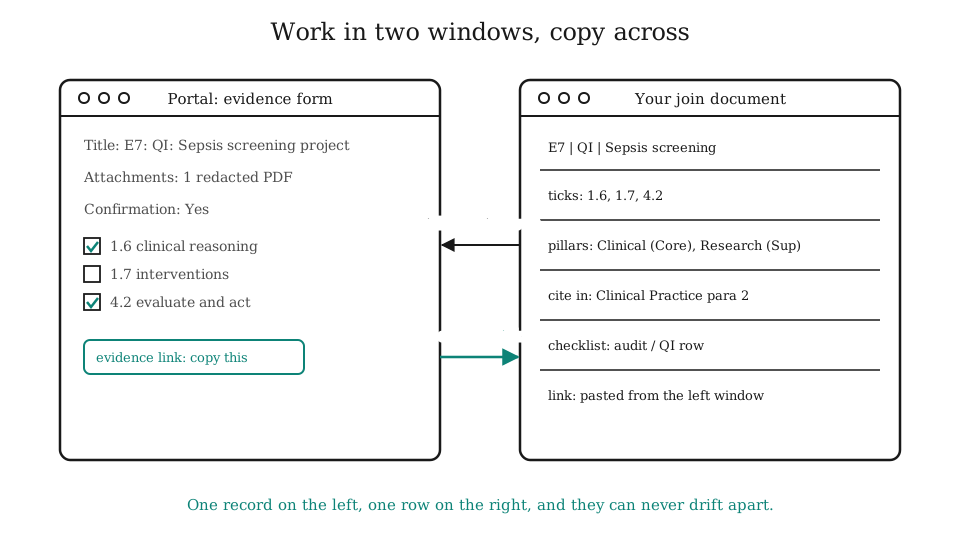
Portal on the left, join document on the right, and copy across. One record, one row, and they can never drift apart.
Back cover
Before you start, hear this
You have five years of advanced practice behind you and a portal in front of you. This book walks the submission backwards from the frozen portfolio, so the first thing you write is the last thing you need, and nothing is written twice.
Inside
- The whole submission as four objects and one freeze.
- One evidence item traced through every portal screen, with the crosswalk that gathers the scattered information back together.
- The first sixty minutes: diary, memories, colleagues, and a list that becomes a register.
- The capability grid without the tick inflation, and the pillar plan with honest reuse.
- Skeleton before prose: the official word budgets, the citation rules, and the save routine that stops lost evenings.
- The final gate in order, with the escape hatches mapped.
- Worksheets: the join document, feedback letters, redaction checklist, supervisor questions, peer reviewer invitation.
The rules we keep
- Your narrative stays yours; AI may plan but never write it.
- No patient data, ever; redact before you upload.
- Red is only for failure; calm is a feature.
- Every claim traces to official guidance or the webinar series.
Colophon
Set in the house style: ink on white, one teal accent. Diagrams are deterministic SVG or Mermaid in the hand-drawn look; scene art is generated wordless. Checked against NHS England guidance and the Centre for Advancing Practice webinar series, September 2026.