Chapter 1
The shape of the submission

Sam Archer logs in on a Tuesday evening and counts the menus. Applications and Reports. A learning needs analysis with a status he does not understand. Somewhere behind it all, thirty-eight capabilities and four pillars and a blank narrative with his name on it.
He feels the familiar drop in his stomach, the sense of being handed a large object in the dark. This chapter turns the light on. The object is smaller than it feels.
- named the four objects that make up the whole submission, with their numbers;
- seen how the four objects join together, and which one drives;
- understood why working backwards means nothing you write gets thrown away;
- set up your progress map in the sidebar, saved in your browser.
The four objects
Strip the portal back to what the verifier actually reads and there are four objects. Nothing else is assessed.
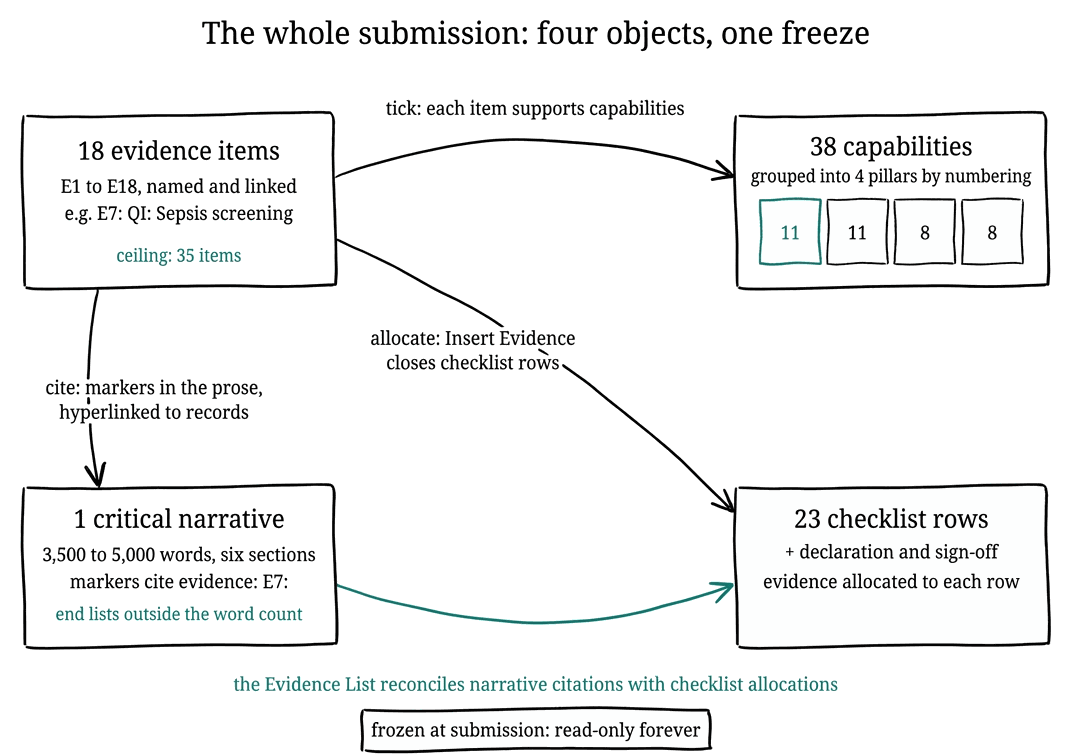
- The evidence register. Up to thirty-five items, and in practice around eighteen, each one a record with a title, a code, a description, and one or more attachments. These are the exhibits; every other object points at them.
- The capability mapping. The 2025 framework has thirty-eight capabilities grouped into four pillars: Clinical Practice (11), Leadership and Management (11), Education (8), and Research (8). Each evidence item carries ticks against the capabilities it supports; the guidance suggests one or two high-quality items per capability, and four to six distinct items per pillar.
- The critical narrative. One essay of 3,500 to 5,000 words across six sections: an introduction, one section per pillar, a conclusion, plus references and an evidence list that sit outside the word count. Within the prose, your evidence appears as citations like [CS1] or E7:, each one a link to the matching record.
- The checklist and declaration. Twenty-three requirements, from the two reflective case studies to the GDPR statement, each satisfied by allocating evidence through the Insert Evidence button, finished with your educational supervisor's sign-off and your declaration.
The four joins
The objects are simple; the joins are the craft.
- Ticks. Evidence items tick capabilities, many to many.
- Belongs to. Capabilities belong to pillars, fixed by their numbering, so a tick on capability 1.6 is automatically a contribution to Clinical Practice.
- Cites. The narrative cites evidence items as linked citations, hyperlinked markers that point at their exhibit.
- Allocates. The checklist takes evidence items allocated to its rows, one Insert Evidence at a time.
One item can do several of these jobs at once, and the strongest portfolios are built from items that do.
Hear the rule that holds it all together: completion means the register, the capability ticks, the narrative markers, the hyperlinks and the checklist allocations all agree with each other. Every check in this course, and every finding this project's assurance report can produce, is a restatement of that one rule from a different angle.
Where this course starts in the route
For completeness, here is the road before this book.
- Check eligibility, gain your employer's endorsement, and submit an expression of interest.
- Join the waiting list; demand is high, and the wait is normal.
- Hold the Learning Needs Analysis, the gateway: your educational supervisor contacts you within a month of assignment, and you prepare your documents and confidence ratings at least five working days before the meeting.
- Begin at a recorded outcome of progress, with a twelve-month window in which you assemble everything in this chapter, and submit.
If your outcome involves further learning, the same map applies once that learning is done.
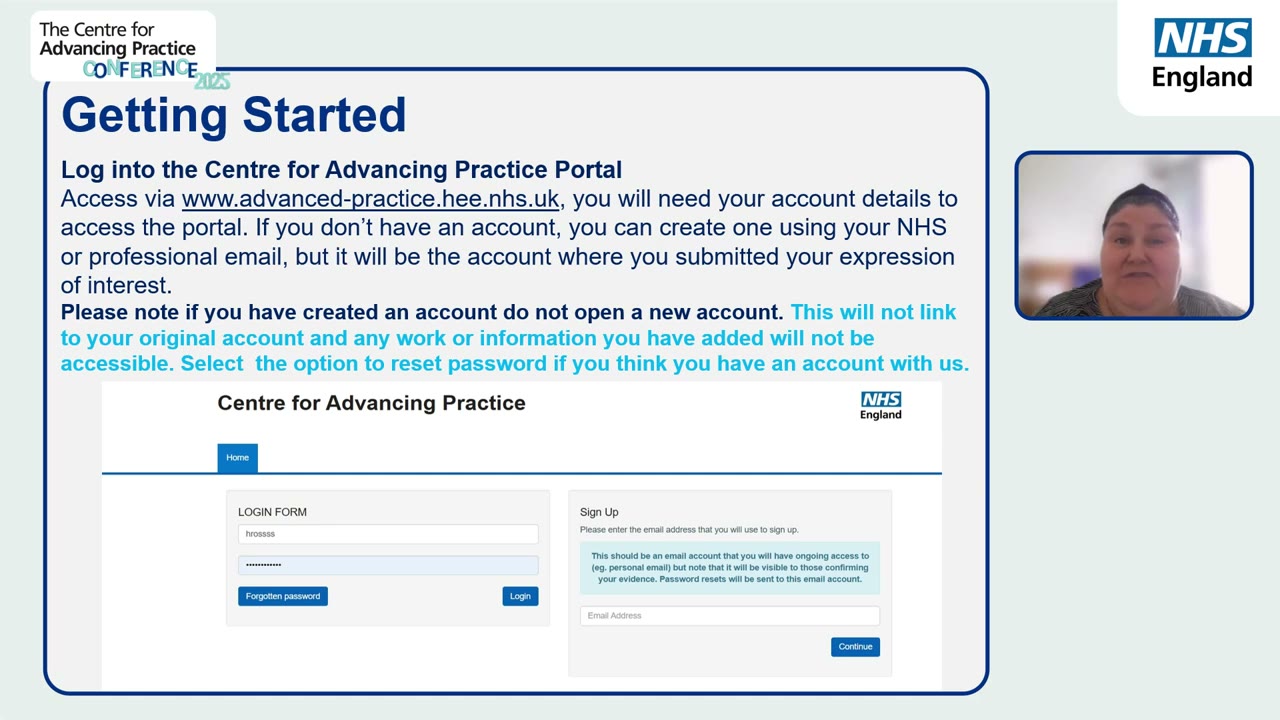
When you log in, use the account that submitted your expression of interest. The portal warns against opening a new one: a second account does not link to your original, and anything you added there will not be visible.
- The mistake. Reading the portal menu as the syllabus, and treating every screen as a thing to study.
- What goes wrong. The menu is organised around tasks, not around what gets read, so studying it never reveals the shape. Hours go in, and the object is still large and dark.
- Do this instead. Keep the four objects in view: the register, the ticks, the narrative, the checklist. If a screen does not feed one of those, it is machinery, and machinery can wait.
Make one folder called ePortfolio today, with three empty subfolders: evidence, narrative, and admin. Every file you gather from now on goes straight into one of the three. The single most common cause of lost weeks at submission time is hunting for documents across email, downloads and old USB sticks, and this one habit kills it before it starts.
Sam Archer opened this chapter feeling that the ePortfolio was a fog. He can now say it out loud: eighteen items, thirty-eight ticks, one essay of bounded length, a checklist of twenty-three rows. The fog has become a packing list, and a packing list can be worked. His worry for the next chapter is practical: fine, but where does any of this actually live in the portal?
- you can name the four objects and their numbers without looking;
- you can say why the narrative is written sixth, not first;
- your ePortfolio folder exists with its three subfolders;
- the sidebar progress list shows where you stand.